


Quelque part sur votre ordinateur, il y a's Une feuille de calcul pleine de données que vous avez complètement ignorées. Vous savez qu'elle contient des réponses – sur vos clients, vos revenus, vos campagnes – mais vous n'avez ni le temps, ni le budget, ni la patience d'embaucher quelqu'un qui se présente comme « data scientist » sur LinkedIn.
Ici's la réalité: AI pour l'analyse des données Cette solution a rendu le recrutement coûteux facultatif. Inutile de maîtriser Python, SQL ou d'avoir un diplôme en statistiques. Il vous suffit des bons outils, des bonnes instructions et d'un processus reproductible qui ne vous prenne pas tout votre mardi. Ce guide couvre précisément cela : du choix des outils aux instructions concrètes, en passant par un flux de travail étape par étape que vous pouvez mettre en œuvre dès aujourd'hui.
Organisateur Ce que AI L'analyse de données signifie réellement (en langage clair)

L'ancienne méthode contre la AI La voie — Ce qui a changé et ce qui n'a pas changé
Méthode traditionnelle : vous exportez un fichier CSV, vous l’ouvrez dans Excel, vous plissez les yeux sur 4 000 lignes, et soit vous abandonnez, soit vous payez quelqu’un 200 $ de l’heure pour que ce soit compréhensible. AI de la même manière : Vous téléchargez le même CSVPosez une question en langage clair et obtenez une analyse structurée en moins de 60 secondes. Les données n'ont pas changé. L'accès, si.
Organisateur Ce que's Ce qui se passe en coulisses AI Lit vos données
AI utilisation des outils traitement du langage naturel Ils analysent vos données comme le ferait un analyste humain, mais plus rapidement et sans frais. Ils identifient les schémas, signalent les anomalies et font ressortir les tendances en fonction de vos questions.
Pourquoi « Je ne suis pas doué(e) avec les chiffres » n'est plus une excuse valable
Tous les outils présentés ici fonctionnent avec des requêtes en langage naturel. Si vous savez écrire un courriel, vous pouvez effectuer une analyse de données.
Le 7 Best AI Outils d'analyse de données ne nécessitant aucune compétence en programmation
| Outil | Idéal pour | Plan gratuit | Codage requis | Niveau de compétence : |
|---|---|---|---|---|
| chameauAI | Requêtes de données conversationnelles | Oui | Non | Débutant |
| Julius IA | CSV/analyse de feuilles de calcul | Oui (limité) | Non | Débutant |
| Copilote Power BI | Équipes BI d'entreprise | Non | Non | Intermédiaire |
| Tableau Pulse | Fourniture automatisée d'informations | Non | Non | Intermédiaire |
| ChatGPT / Claude | Résumés rapides et nettoyage | Oui | Non | Débutant |
| Google Looker Studio | Reportage visuel gratuit | Oui | Non | Débutant |
| Zoho Analytics (Zia) | BI pour les petites entreprises | Oui | Non | Débutant |
Comment commencer à utiliser AI pour l'analyse des données — Un flux de travail étape par étape
Étape 1 — Préparez vos données
Nettoyez votre fichier avant toute chose. Supprimez les lignes en double, indiquez « N/A » dans les cellules vides et assurez-vous que chaque en-tête de colonne est clair et cohérent. Les fichiers CSV ou XLSX sont les plus compatibles avec la plupart des systèmes de fichiers. AI outils.
Étape 2 — Choisissez l'outil adapté à votre objectif
Besoin d'un résumé rapide ? Utilisez ChatGPT. Besoin de tableaux de bord récurrents ? Optez pour Power BI ou Looker Studio. Besoin d'une analyse CSV approfondie avec des suivis conversationnels ? Julius AI ou camelAI.
Étape 3 — Rédiger des questions qui suscitent de vraies réponses
Mauvaise invite : «Analysez mes données.»
Bonne invite : « Quel produit a enregistré le taux de retour le plus élevé au premier trimestre et quel's « Quelle est la tendance mensuelle des 6 derniers mois ? »
La spécificité est primordiale.
Étape 4 — Lire et vérifier AI Sortie
AI Il arrive souvent que les choses se trompent. Vérifiez toujours la cohérence des chiffres clés avec vos données brutes, surtout avant de les partager avec un client ou une partie prenante.
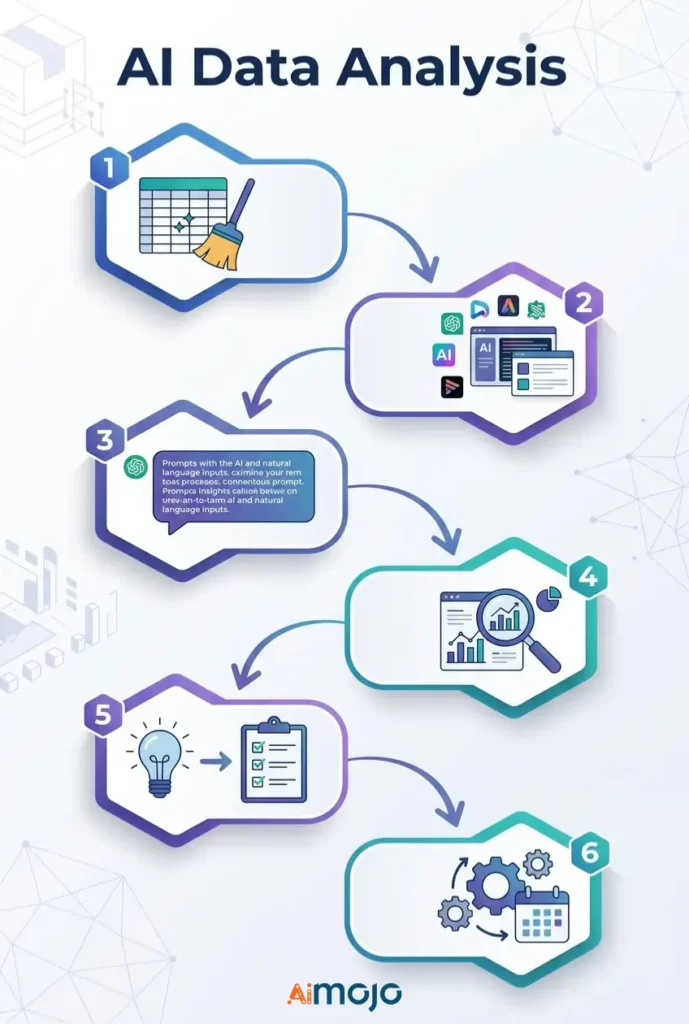
Étape 5 — Passer des idées aux décisions
Une idée sans action concrète n'est qu'un détail. AI trouver, demander : « Qu’est-ce que je vais bien pouvoir faire avec ça ? »
Étape 6 — Automatiser les rapports récurrents
Configurez des actualisations de données planifiées dans Looker Studio, Power BI ou Zoho Analytics pour que les rapports hebdomadaires s'exécutent automatiquement.
Copier coller AI Messages d'erreur exécutés actuellement par des utilisateurs non techniques
Utilisez-les directement dans Julius AI , camelAI ou ChatGPT avec votre jeu de données :
Données de vente
*"Show total revenue by product category for the last 90 days and flag any category with a decline over 20%."*Données de marketing
*"Which traffic source drove the most conversions last month? Break down average cost per conversion by channel."*Tableaux financiers
*"Identify the top 5 expense categories and highlight every month where spending exceeded budget by more than 15%."*Données sur le comportement des clients
*"What's the average purchase frequency per customer segment? Flag segments with the highest churn risk."*Indicateurs RH et d'équipe
*"Compare headcount changes by department over the last 6 months and flag any team with attrition above 10%."*5 erreurs qui vous ruinent AI L'analyse des données est totalement inutile.
- Alimentation avec des données désordonnées et non formatées - AI Impossible de réparer un tableau Excel catastrophique. Données erronées en entrée, résultats erronés – systématiquement.
- Poser des questions générales — « Parlez-moi de vos ventes » ne vous apporte aucune information utile. Soyez précis quant à la période, l'indicateur et l'objectif visé.
- Prendre chaque résultat au pied de la lettre - AI Les outils peuvent induire en erreur. Recoupez les chiffres clés avant de prendre toute décision commerciale importante.
- Utiliser un outil polyvalent pour des travaux spécialisés ChatGPT est performant pour les synthèses, mais pas pour la modélisation financière complexe. Il faut adapter l'outil à la tâche.
- S'arrêter à « intéressant » — La plupart des gens obtiennent un graphique intéressant et ne l'utilisent pas. Chaque analyse commerciale basée sur l'IA doit s'accompagner d'une action concrète.
Qui sommes-nous's Utilisation réelle AI pour l'analyse de données dès maintenant
Il ne s'agit pas de théorie : de vraies personnes effectuent chaque jour des analyses de données sans code :
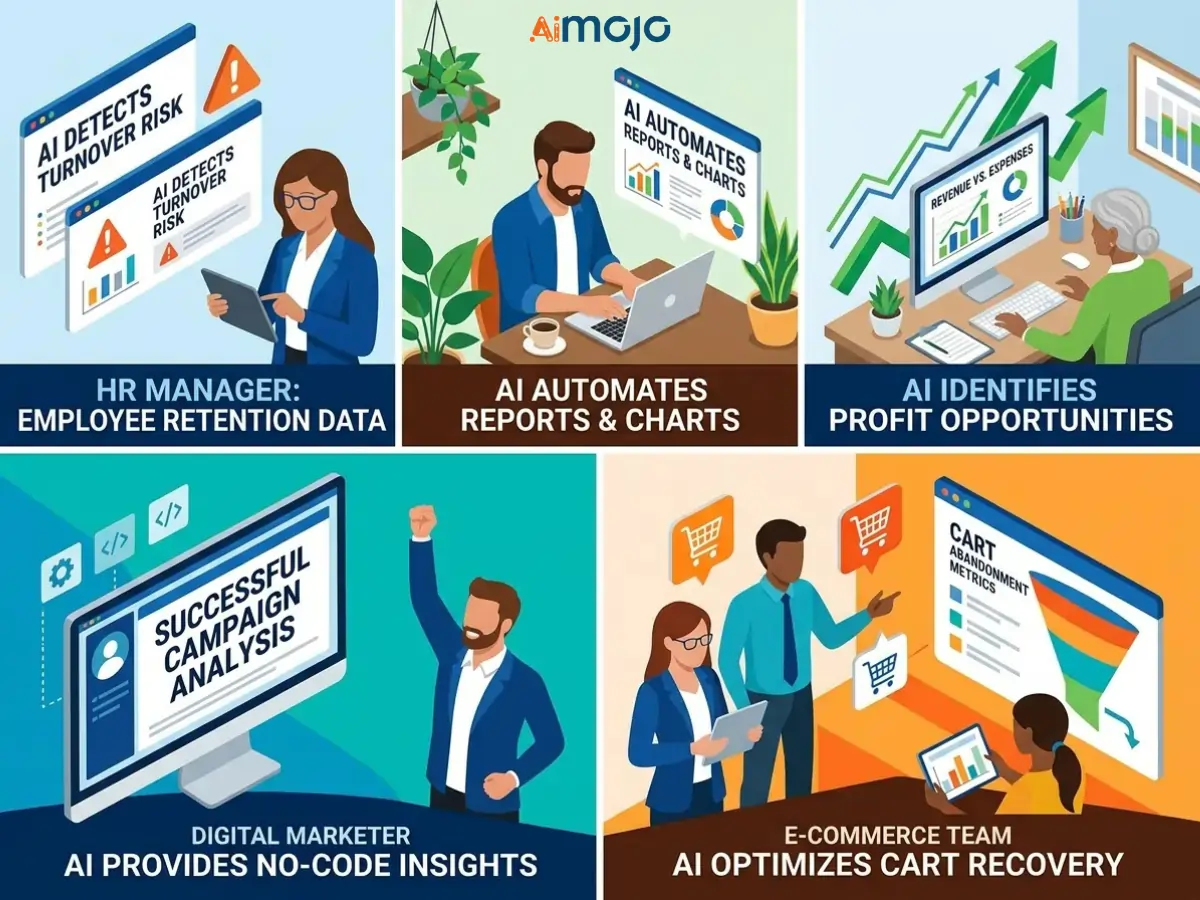
Si vos concurrents le font déjà alors que vous compilez encore vos rapports manuellement, il est essentiel de combler rapidement cet écart.
Gratuit Payant vs. AI Outils d'analyse de données
Ce que les niveaux gratuits peuvent réellement faire
Les versions gratuites de Google Looker Studio, camelAI et Zoho Analytics permettent de gérer efficacement les rapports de base, le suivi simple des tendances et le chargement limité de fichiers. Elles sont réellement utilisables pour les utilisateurs individuels et les petites équipes, et ne se limitent pas à des démonstrations.
Les fonctionnalités qui valent la peine d'être payées à grande échelle
Les abonnements payants débloquent des programmes de mise à jour automatique des données, des limites de téléchargement plus élevées et des fonctionnalités avancées. AI modèles, Intégrations APIet la collaboration multi-utilisateurs. Si vous utilisez AI Pour l'analyse de données à grande échelle ou la création de tableaux de bord clients, la mise à niveau est rapidement rentabilisée.
Frais cachés qui apparaissent après l'inscription
Attention aux prix par siège, aux frais de dépassement du nombre de rangées et aux fonctionnalités « IA premium » verrouillées derrière des barrières payantes que vous ne découvrirez qu'après avoir construit l'intégralité de votre flux de travail au sein de la plateforme.
Comment présenter les données générées par l'IA de manière à ce qu'elles soient réellement prises en compte ?

Tournant AI Des graphiques transformés en histoires qui atterrissent réellement
Les graphiques bruts ne convainquent personne en réunion. Utilisez plutôt… AI Prenez comme point de départ le résultat, puis replacez-le dans son contexte : que s’est-il passé, pourquoi est-ce important et quelles sont les prochaines étapes ?'s la narration de données — et c'est's ce qui pousse les gens à agir.
Création d'un tableau de bord automatisé pour les rapports hebdomadaires
Power BI, Looker Studio et Zoho Analytics vous permettent tous de créer un tableau de bord en direct. AI Créez un tableau de bord une seule fois, connectez-le à votre source de données et ne générez plus jamais de rapport hebdomadaire manuellement. Créez-le une fois, partagez le lien indéfiniment.
Le cadre du « Et alors ? » — Rendre chaque idée prête à être présentée en salle de réunion
Avant de présenter toute information générée par l'IA, répondez rapidement à trois questions :
Questions fréquemment posées
Puis-je effectuer une véritable analyse de données avec AI et si je n'ai aucune formation technique ?
Oui. Des outils comme camelAI, Julius AI et Zoho Analytics (Zia) sont conçus spécifiquement pour les utilisateurs non techniques. Il suffit de poser des questions en langage clair pour obtenir des informations structurées.
Quel est le meilleur gratuit AI Un outil d'analyse de données en 2026 ?
Google Looker Studio est la meilleure option gratuite pour la création de rapports visuels. camelAI et Jules AI Les deux proposent des versions gratuites performantes pour l'analyse de fichiers CSV et de feuilles de calcul.
Comment analyser des données Excel ou Google Sheets à l'aide de l'IA ?
Téléchargez votre fichier directement sur Julius AI ou camelAI, ou connectez votre feuille Google à Looker Studio ou Zoho Analytics pour une analyse automatisée continue.
ChatGPT est-il réellement fiable pour l'analyse des données d'entreprise ?
Pour résumer, nettoyer et expliquer des données, oui. Pour des calculs complexes ou de grands ensembles de données, utilisez-le avec un outil dédié comme Power BI Copilot ou Julius AI.
Organisateur Ce que's la véritable différence entre AI Analyse de données et outils de BI traditionnels ?
Les outils de BI traditionnels vous obligent à construire des requêtes et à savoir précisément ce que vous recherchez. Les plateformes d'analyse basées sur l'IA font émerger des informations de manière proactive et répondent au langage naturel ; aucune configuration n'est requise.
Les analyses générées par l'IA sont-elles fiables ? Dois-je leur faire entièrement confiance ?
Non. Toujours vérifier. AI comparez les résultats à vos données brutes avant de les utiliser dans toute décision commerciale ou présentation destinée aux clients.
Ai-je besoin de connaître SQL ou Python pour utiliser ces outils ?
Aucun outil de cette liste ne le permet. Ils prennent tous en charge les requêtes de données en langage naturel sans aucune programmation requise.
Quels types de fichiers de données fonctionnent le mieux avec AI outils d'analyse ?
Les fichiers CSV et XLSX sont compatibles avec la quasi-totalité des outils mentionnés ici. Les formats JSON et Google Sheets sont également largement pris en charge sur toutes les plateformes.
Destination AI L'analyse des données est la prochaine étape (et ce que cela signifie pour vous)
La prochaine vague de AI Les outils d'analyse n'attendront pas que vous posiez des questions. Agentique AI systèmes de surveillance des données Surveillez vos indicateurs 24h/24 et 7j/7 et soyez alerté dès que quelque chose semble anormal, avant que la situation ne dégénère en véritable problème.
Auparavant, les prévisions nécessitaient un analyste spécialisé. Désormais, des outils comme Tableau Pulse et Power BI Copilot rendent l'analyse prédictive accessible aux utilisateurs professionnels en un clic quasi instantané.
Les data scientists ne disparaissent pas, mais l'écart entre leurs compétences et celles d'un utilisateur non technique équipé d'IA se réduit chaque trimestre. Plus tôt vous maîtriserez ces outils, plus vous aurez d'atouts.
AiMojo recommande :


 BONUS: Obtenez notre 200 $ «AI « Boîte à outils de maîtrise » GRATUITE lors de votre inscription !


![14 meilleurs nus AI Générateurs en 2026 [Gratuits et payants]](https://aimojo.io/wp-content/uploads/2024/01/Best-Naked-AI-Generators-100x100.webp)



