

Información clave sobre Voicemod
Voicemod is a real-time AI voice changer and soundboard that modifies microphone audio during games, livestreams, and online conversations. It combines hundreds of voice effects, customizable audio controls, soundboards, and virtual microphone integration in one application.
What makes Voicemod interesting to me is its approach to live audio. Instead of generating a voice recording separately, it processes speech while you're talking, making it useful for situations where timing matters.
For this AIMojo review, I'm examining its audio processing, device compatibility, PRO features, creator workflows, and practical limitations. The key question isn't simply how many voices it offers. It's how effectively those voices fit into an existing microphone setup without disrupting communication.
How Does Voicemod's Información de Evacuación AI Voice Changer Work?
Voicemod converts incoming microphone audio into modified speech and sends the result to communication applications through a virtual microphone. The software combines traditional audio effects with modelos de aprendizaje automático to produce different vocal identities.
I find its virtual microphone architecture particularly useful because compatible applications receive the modified signal as ordinary microphone input.
AI Voice Conversion vs Traditional Voice Modulation
Traditional voice modulation adjusts properties such as pitch, distortion, echo, and frequency balance. Voicemod's AI voices go further by changing vocal characteristics while preserving the timing and expression of the original performance.
Por ejemplo, la directriz AI character voices can create substantially different vocal identities, while simpler filters produce robotic, radio, or pitch-shifted effects.
Su AI models use training data created with professional voice actors. English speech generally produces better results than languages with different phonetic structures.
Importantly, Voicemod is not primarily a text-to-speech platform or a tool for cloning a specific person's voice.
CPU, RAM, and Operating System Requirements
Hardware compatibility matters more with AI voices than with basic filters.
| Parámetro técnico | Requisito |
|---|---|
| Windows | Windows 10/11, 64-bit |
| macOS | Supported devices running macOS Ventura 13 or newer |
| CPU de Windows | Quad-core 2 GHz minimum |
| RAM | 8 GB mínimo, se recomiendan 16 GB |
| AI Procesabilidad | AVX2 support required for applicable desktop AI voces |
| Internet | Required for account services, updates, and content downloads |
My recommendation is to check CPU compatibility before purchasing PRO. Having enough RAM does not compensate for missing processor instructions.
Free vs PRO: Which Plan Is Worth Paying For?
Voicemod Free provides a useful entry point, but PRO is designed for people who regularly switch between voice identities or maintain multiple soundboards.
| Capacidad | Free | PRO |
|---|---|---|
| Voice presets | Daily rotating selection | biblioteca completa |
| Soundboards | Un | Ilimitado |
| Custom Voicelab voices | ❌ | ✅ |
| Premium PRO collections | Limitada | Incluido |
| Los Atajos de teclado | ✅ | ✅ |
| Virtual microphone | ✅ | ✅ |
| Contenido de la comunidad | ✅ | ✅ |
| Separate licensed store packs | Pagado por separado | Pagado por separado |
Voicemod PRO Pricing and Lifetime Access
The US iOS App Store lists $6.99 monthly, $29.90 annually, and a $54.99 one-time license. It also displays a promotional lifetime-license item priced at $44.
These are mobile storefront prices, not universal desktop prices. Voicemod displays desktop purchase prices within its application.
I would choose the free version for occasional Discord conversations. PRO becomes more attractive for daily streaming, character creation, or managing sound effects across several projects.
One important distinction: officially licensed Premium Soundboards sold through the Voicemod Store are separate purchases, even for PRO subscribers.
How to Set Up Voicemod on Discord Without Audio Problems
Voicemod works with Discord by replacing the microphone input selected inside Discord. You do not need a separate Discord voice-changing account.
For a reliable setup, I recommend configuring the physical microphone first, then introducing Voicemod into the signal chain.
Configure the Voicemod Virtual Microphone
- Install Voicemod on a compatible Windows or macOS computer.
- Open Voicemod and select your physical microphone as the input.
- Choose your actual headphones as the monitoring output.
- Enable the Voice Changer and select a voice effect.
- Discordia abierta's Settings > Voice & Video.
- Select Voicemod Virtual Microphone as the input device.
- Keep your physical headphones as Discord's dispositivo de salida.
Use Discord's microphone test to confirm the modified voice is received.
I would also use Discord's Studio input profile where available to prevent overlapping noise suppression from affecting Voicemod's processed audio.
Route Voicemod Into OBS for Livestreaming
For OBS Studio, select the Voicemod virtual microphone under Settings > Audio > Mic/Auxiliary Audio.
Avoid capturing the physical microphone and Voicemod microphone simultaneously. That configuration can produce doubled speech or an unwanted echo.
Record a short sample before broadcasting. Check microphone levels, soundboard volume, background music, and speech clarity separately.
My preferred diagnostic order is input detection, virtual device selection, duplicate audio sources, and finally effect processing.
Building Reusable Audio Presets with Voicelab Custom Voices
Voicelab is Voicemod's PRO-only creación de voz environment. It lets creators combine audio processors instead of relying entirely on predefined character voices.
Its available controls include pitch modification, delay, reverb, vocoder-style processing, and other vocal effects.
Creating a Character Voice With Layered Effects
For a fictional radio operator, I would approach the design in stages.
Start with pitch adjustment to establish vocal identity. Add restrained distortion for radio coloration, then introduce a modest amount of reverb to suggest environmental space.
Keep each processing layer controlled. Excessive reverb can bury consonants, while aggressive pitch changes may reduce intelligibility.
Once the configuration sounds appropriate, save it in Voicelab, assign a recognizable name, and add it to a soundboard.
This is useful for recurring game characters, scripted online performances, and creators who need consistent vocal identities.
Custom Soundboards, Keybinds, and Instant Replay
Voicemod Soundboard sends preloaded audio clips directly into supported microphone-based conversations.

Users can import MP3 and WAV files, organize sounds into collections, and assign keyboard shortcuts for immediate playback.
The soundboard supports multiple playback behaviors, including looping, restarting, pausing, and overlapping clips.
Recording Audio and Controlling Live Reactions
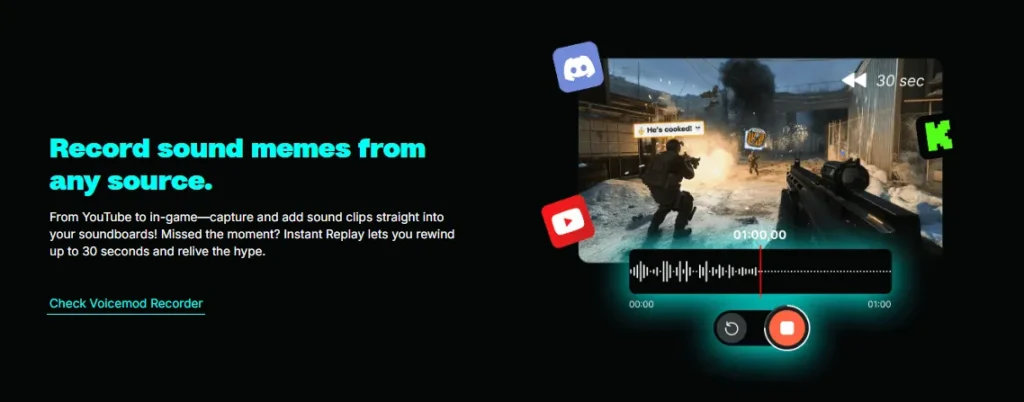
Voicemod Recorder supports desktop audio capture and Instant Replay with a buffer of up to 30 seconds.
That makes it possible to capture an unexpected reaction and turn it into a reusable soundboard clip.
I particularly like the operational value of combining keybinds with soundboard folders. A streamer can maintain distinct collections for introductions, reacciones de la audiencia, character changes, and ending sequences.
The mobile app also functions as a remote controller for desktop voices and soundboards.
For live voice changing on supported consoles or within mobile communication apps, however, additional Voicemod Key hardware is required.
Voicemod Industry Applications
Voicemod serves entertainment first, but its real-time audio architecture can also support production and communication workflows.
The strongest applications involve immediate vocal performance rather than automated narration.
| Experiencia | Aplicación práctica | Ventaja técnica |
|---|---|---|
| Sector del juego | Character roleplay during multiplayer sessions | Live character switching without prerecorded dialogue |
| Transmisión en vivo | Audience interaction and event reactions | Keybind-controlled sound triggers |
| Producción de Video | Recording fictional character dialogue | Virtual microphone capture through recording software |
| Educación | Interactive storytelling and theatrical demonstrations | Multiple character identities from one performer |
| Marketing Digital | Live campaign characters and promotional streams | Reusable branded voice effects |
| Producción de podcasts | Fictional segments and sound effects | Separate effect playback during recording |
Which Professional Workflows Benefit Most?
For content creators, the biggest advantage is reducing the time between performing a voice and capturing it.
Voicemod works particularly well when the speaker must react naturally to other participants. It is less appropriate for bulk narration, automated dubbing, or projects requiring precise multilingual speech generation.
I would also avoid using disguised voices in customer interactions where identity and transparency matter.
Para commercial videos, creators should verify the usage rights of community clips and licensed soundboard content before publishing.
Voicemod Privacy, Performance, and Customer Support
Voicemod maintains a published privacy policy and provides technical support through its Help Center and support forms.
The company states that it does not listen to conversations during real-time voice changing. Its policy also describes the collection of account information, diagnostics, usage activity, and purchase information.
That distinction matters. Audio processing privacy and general application data collection are separate issues.
Troubleshooting Latency, Distortion, and Missing Voices
The most common technical problems to investigate are incorrect microphone selection, unsupported CPUs, overlapping audio processing, and missing voice assets.
Si un AI voice is unavailable, check its PRO entitlement and AVX2 requirements. If speech becomes distorted, examine microphone input levels and the active effects before changing software.
Some voice assets must download successfully before they can function, so connection problems can also affect availability.
Pros and Cons for Creators
My overall assessment is that Voicemod offers stronger value as a live performance tool than as a traditional audio editor.
- Extensive voice preset selection.
- Real-time voice conversion.
- Flexible custom effects through Voicelab.
- Discord and streaming compatibility.
- Soundboard with community content.
- Mobile and console expansion.
- Free voice selection rotates.
- AI voices depend on compatible hardware.
- Voicelab requires PRO.
- Audio routing requires initial configuration.
- Certain licensed packs cost extra.
- Live mobile and console routing needs extra hardware.
The most attractive feature is the combination of character voices and immediate sound playback. The main limitation is that results depend on the microphone, computer, and routing setup.
Voicemod FAQs
These answers address the most common questions about Voicemod compatibility, pricing, and AI voice features.
Is Voicemod completely free to use?
Voicemod offers a free plan with rotating voice effects and one soundboard. PRO unlocks the full voice library, unlimited soundboards, and Voicelab custom voice creation.
Can I use Voicemod on Discord and OBS?
Yes. Install Voicemod, configure your microphone, and select its virtual microphone as the input device in Discord or OBS. Keep Voicemod running during use.
Does Voicemod work on mobile phones?
Yes. Voicemod has Android and iOS apps for soundboards, recorded voice effects, and desktop remote control. Live voice changing in mobile calls requires compatible Voicemod Key hardware.
Does Voicemod support voice cloning?
Voicemod provides AI character voices and custom effect creation through Voicelab. Its standard voice-changing features are not equivalent to training an exact voice replica of a particular individual.
Is Voicemod Worth Using?
Voicemod is a strong choice for creators, gamers, and streamers who need real-time voice effects, character performances, and soundboard control.
Its most useful capability is sending modified microphone audio directly into existing communication and recording applications.
I recommend starting with the free version to confirm microphone compatibility and voice quality before upgrading. PRO makes the most sense for frequent users who need custom voices and multiple soundboards.
For automated voiceovers or long-form narration, a dedicated AI speech generation platform would be a better fit.


