

Σημαντική Ενημέρωση 2026
ΑνοικτόAI διέκοψε τις εμπειρίες ιστού και εφαρμογών Sora στις 26 Απριλίου 2026. Το API Sora έχει προγραμματιστεί να διακοπεί στις 24 Σεπτεμβρίου 2026. Εξαιτίας αυτού, αυτό το άρθρο δεν αποτελεί πλέον οδηγό για τη δημιουργία νέων ροών εργασίας γύρω από το Sora. Έχει ξαναγραφτεί για να βοηθήσει τους δημιουργούς να συγκρίνουν εναλλακτικές λύσεις για το Sora, αντικαταστάσεις Sora και ενεργές AI εργαλεία ροής εργασίας βίντεο.
Αν χρησιμοποιήσατε το Sora για AI Για τη δημιουργία βίντεο, η ασφαλής κίνηση είναι απλή: εξαγάγετε το υπάρχον περιεχόμενό σας, σταματήστε να δημιουργείτε νέα συστήματα παραγωγής γύρω από το Sora και επιλέξτε ένα αντικαταστάτη με βάση αυτό που πραγματικά δημιουργείτε.
Μερικοί δημιουργοί χρειάζονται κινηματογραφική μετατροπή κειμένου σε βίντεο. Κάποιοι χρειάζονται κλιπ εικόνας σε βίντεο για διαφημίσεις και αναρτήσεις στα μέσα κοινωνικής δικτύωσης. Κάποιοι χρειάζονται AI avatars για εκπαίδευση, πωλήσεις ή περιεχόμενο μαθημάτων. Άλλα χρειάζονται λεζάντες, πρότυπα, επεξεργασία, τοπική προσαρμογή, storyboarding ή ροές εργασίας μάρκετινγκ με δυνατότητα άμεσης μετατροπής σε βίντεο.
Δεν υπάρχει μία και μοναδική, καλύτερη αντικατάσταση του Sora για όλους. Το κατάλληλο εργαλείο εξαρτάται από την εργασία που έκανε ο Sora μέσα στη ροή περιεχομένου σας.
Αυτός ο οδηγός συγκρίνει τις καλύτερες εναλλακτικές λύσεις Sora ανά ροή εργασίας, με σαφείς παραμέτρους για κάθε εργαλείο, ώστε να μπορείτε να επιλέγετε πιο γρήγορα και να αποφεύγετε την ανακατασκευή ολόκληρης της παραγωγικής σας διαδικασίας από το μηδέν.
Γρήγορη απάντηση: Οι καλύτερες αντικαταστάσεις Sora ανά περίπτωση χρήσης
Αν χρειάζεστε κινηματογραφικό AI δημιουργία βίντεο, ξεκινήστε με Kling AIΑν χρειάζεστε storyboards, χαρακτήρες, οπτικές αναφορές και δημιουργική προπαραγωγή, δοκιμάστε OpenArtΑν χρειάζεστε ομιλούντες χαρακτήρες, πολύγλωσσους παρουσιαστές ή εκπαιδευτικά βίντεο, HeyGen είναι η καλύτερη επιλογή. Αν χρειάζεστε λεζάντες, επεξεργασία στα μέσα κοινωνικής δικτύωσης, επαναχρησιμοποίηση και ταχύτητα δημοσίευσης, χρησιμοποιήστε ΒΛΕΠΩΑν θέλετε να μετατρέψετε προτροπές ή σενάρια σε πλήρη βίντεο μάρκετινγκ, συγκρίνετε InVideo AI.
| Παλιά ροή εργασίας Sora | Η καλύτερη αντικατάσταση του Sora |
|---|---|
| Κινηματογραφικά κλιπ μετατροπής κειμένου σε βίντεο | Kling AI |
| Κινούμενη εικόνα σε βίντεο | Kling AI ή OpenArt |
| Πολλαπλών πλάνων σενάριο | OpenArt ή Kling AI |
| Ανάπτυξη οπτικής ιδέας | OpenArt |
| Βίντεο με ομιλούντα avatar | HeyGen |
| Εκπαίδευση, ένταξη και επεξηγητές πωλήσεων | HeyGen ή VEED |
| Υπότιτλοι και επεξεργασίες σε κοινωνικά δίκτυα | ΒΛΕΠΩ |
| YouTube Shorts, Reels, TikToks | VEED ή Τεχνητή Νοημοσύνη InVideo |
| Βίντεο με προτροπή για μάρκετινγκ | InVideo AI |
| Βίντεο προώθησης προϊόντων | Kling AI, OpenArt, VEED ή InVideo AI |
| Γρήγορη εβδομαδιαία παραγωγή περιεχομένου | VEED ή Τεχνητή Νοημοσύνη InVideo |
Το λάθος είναι να κυνηγάς τους πιο διαφημισμένους AI εργαλείο βίντεο. Η καλύτερη κίνηση είναι να επιλέξετε το εργαλείο που αντικαθιστά ακριβώς τη ροή εργασίας σας.
Τι απέγινε η Σόρα;
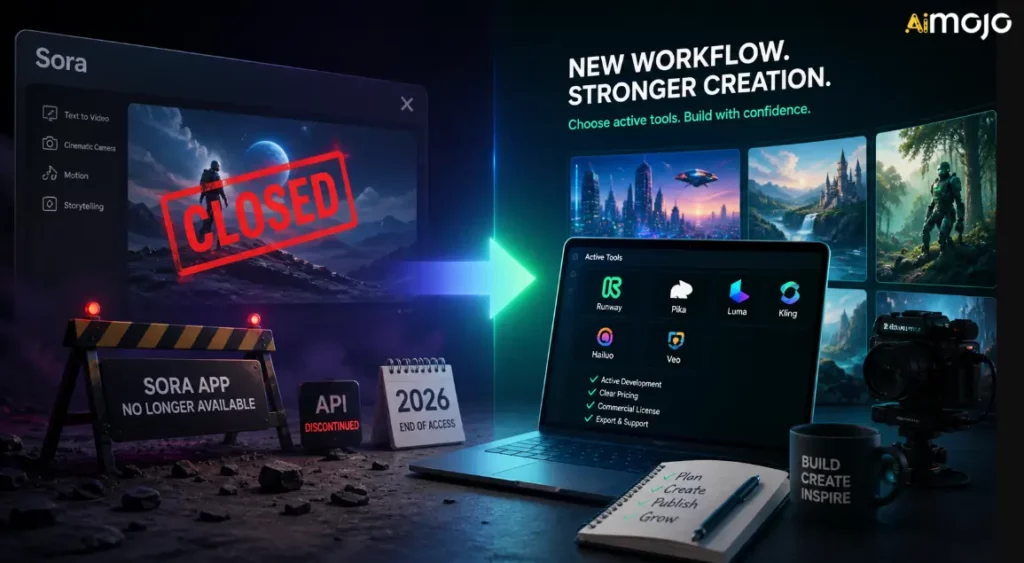
Η Σόρα ήταν μια από τις πιο πολυσυζητημένες AI εργαλεία βίντεο επειδή έδειξε πόσο μακριά μπορεί να φτάσει η δημιουργία κειμένου σε βίντεο. Οι δημιουργοί θα μπορούσαν φανταστείτε κινηματογραφικές σκηνές, κίνηση, κατεύθυνση κάμερας και οπτική αφήγηση από προτροπές αντί να ξεκινάτε με κάμερα, πλάνα αρχείου ή μια παραδοσιακή ροή εργασίας κινούμενων σχεδίων.
Αλλά το Sora δεν είναι πλέον ένα σταθερό κέντρο ροής εργασίας για δημιουργούς. OpenAI's Η επίσημη σελίδα διακοπής επιβεβαιώνει δύο βασικές ημερομηνίες:
Αυτό σημαίνει ότι η κανονική εμπειρία ιστού/εφαρμογής Sora είναι ήδη κλειστή, ενώ οι ροές εργασίας που εξαρτώνται από API έχουν μόνο περιορισμένο διάδρομο. Εάν χρησιμοποιούσατε το Sora μέσω άλλης πλατφόρμας, προσαρμοσμένου αυτοματισμού ή εσωτερικής ροής εργασίας βίντεο, θα πρέπει να το αντιμετωπίσετε ως προσωρινό, εκτός εάν η πλατφόρμα έχει μετακινηθεί σε άλλο μοντέλο.
OpenAI's Η επίσημη σελίδα βοήθειας εξηγεί το χρονοδιάγραμμα και την πορεία των εξαγωγών, αλλά δεν παρέχει μια εκτενή δημόσια εξήγηση για κάθε επιχειρηματικό λόγο πίσω από το κλείσιμο. Δημόσια αναφορά από την Axios ανέφερε ότι το OpenAI περιόριζε την εστίαση και τους ανθρώπινους/υπολογιστικούς πόρους, με το Sora να καταναλώνει σημαντικό υπολογιστικό κόστος. Η Axios ανέφερε επίσης ότι το OpenAI's Η ερευνητική ομάδα του Sora θα συνεχίσει να επικεντρώνεται στην έρευνα προσομοίωσης κόσμου για ρομποτική και εργασίες του φυσικού κόσμου.
Για τους δημιουργούς, το πρακτικό συμπέρασμα είναι πιο σημαντικό από την πολιτική του κλεισίματος:
Πώς να επιλέξετε μια εναλλακτική λύση Sora
Πριν εγγραφείτε σε άλλο AI πλατφόρμα βίντεο, χρησιμοποιήστε αυτές τις παραμέτρους. Έχουν μεγαλύτερη σημασία από τη διαφημιστική εκστρατεία.
1. Τύπος εξόδου
Ρωτήστε τι παράγει στην πραγματικότητα το εργαλείο. Ορισμένα εργαλεία παράγουν πρωτότυπα AI βίντεο κλιπ. Κάποια κινούμενα σχέδια εικόνων. Κάποια δημιουργούν βίντεο avatar. Κάποια δημιουργούν βίντεο μάρκετινγκ που βασίζονται σε πρότυπα. Κάποια είναι συντάκτες με AI χαρακτηριστικά.
Αν χρειάζεστε κινηματογραφικό AI σκηνές, επιλέξτε ένα εργαλείο δημιουργίας βίντεο. Εάν χρειάζεστε εβδομαδιαία κοινωνικό περιεχόμενο, ένας συντάκτης μπορεί να είναι πιο πολύτιμος.
2. Δημιουργικός Έλεγχος
Αναζητήστε στοιχεία ελέγχου όπως αναλογία διαστάσεων, διάρκεια, κίνηση κάμερας, εικόνες αναφοράς, αρνητικές προτροπές, σχεδιασμός storyboard, συνέπεια χαρακτήρων, αλληλουχία σκηνών και ροές εργασίας επεξεργασίας πριν από τη δημιουργία.
Όσο πιο σοβαρή είναι η παραγωγική σας εργασία, τόσο περισσότερο έλεγχο χρειάζεστε.
3. Προσαρμογή ροής εργασίας
Οι δημιουργοί συχνά υπερεκτιμούν την ποιότητα της δημιουργίας και υποεκτιμούν την ταχύτητα της ροής εργασίας. Αν το εμπόδιο σας είναι οι υπότιτλοι, η αλλαγή μεγέθους, τα πρότυπα, η κριτική και η δημοσίευση, ένα καθαρό AI Η γεννήτρια βίντεο δεν θα λύσει το πλήρες πρόβλημα.
4. Εμπορικά Δικαιώματα
Πριν χρησιμοποιήσετε δημιουργημένα κλιπ σε διαφημίσεις, εργασίες πελατών, μαθήματα επί πληρωμή, δημιουργία εσόδων από το YouTube ή καμπάνιες επωνυμίας, ελέγξτε το εργαλείο's όροι. Η εμπορική χρήση μπορεί να εξαρτάται από το σχέδιο, το μοντέλο, τα περιουσιακά στοιχεία, το υλικό αρχείου, τη φωνή, το avatar ή την περιοχή.
5. Κόστος και Πιστώσεις
AI Ένα βίντεο μπορεί να γράψει γρήγορα τους τίτλους τέλους. Ένα εργαλείο που φαίνεται φθηνό στη σελίδα τιμολόγησης μπορεί να γίνει ακριβό όταν δημιουργείτε πολλές παραλλαγές, προτροπές δοκιμών, αναβαθμισμένη παραγωγή ή χρειάζεστε μεγαλύτερα κλιπ.
6. Χρήση από την ομάδα και τον πελάτη
Εάν συνεργάζεστε με πελάτες ή με μια ομάδα, αναζητήστε συνεργασία, κιτ επωνυμίας, πρότυπα, κοινόχρηστα έργα, επιλογές εξαγωγής και προβλέψιμες ροές εργασίας έγκρισης.
Οι καλύτερες εναλλακτικές λύσεις Sora ανά ροή εργασίας
| Εργαλείο | Το καλύτερο για | Κύρια δύναμη | Καλύτερος αγοραστής |
|---|---|---|---|
| Kling AI | Κινηματικός AI βίντεο | Κείμενο σε βίντεο, εικόνα σε βίντεο, κίνηση, κινηματογραφική έξοδος | Δημιουργοί, ομάδες διαφημίσεων, επαγγελματίες μάρκετινγκ προϊόντων |
| OpenArt | Storyboarding και δημιουργικά στοιχεία | Οπτικές ιδέες, χαρακτήρες, σχεδιασμός γυρισμάτων, προπαραγωγή | Σχεδιαστές, κινηματογραφιστές, δημιουργικές ομάδες |
| HeyGen | Άβαταρ που μιλάνε | Βίντεο με παρουσιαστή, σενάρια, τοπική προσαρμογή, επαναλήψιμο επιχειρηματικό περιεχόμενο | Ομάδες SaaS, εκπαιδευτικοί, πρακτορεία, ομάδες πωλήσεων |
| ΒΛΕΠΩ | Κοινωνική επεξεργασία και λεζάντες | Υπότιτλοι, αλλαγή μεγέθους, επεξεργασία, επαναχρησιμοποίηση, βελτίωση έκδοσης | Κοινωνικές ομάδες, δημιουργοί, εκπαιδευτικοί, επαγγελματίες μάρκετινγκ |
| InVideo AI | Βίντεο με προτροπή για μάρκετινγκ | Σενάρια, γραφικά, φωνητικές εντολές, σκηνές, ολοκληρωμένες ροές εργασίας βίντεο | YouTubers, πρακτορεία, μικρές επιχειρήσεις |
1. Kling AI: Η καλύτερη αντικατάσταση του Sora για Cinematic AI Βίντεο
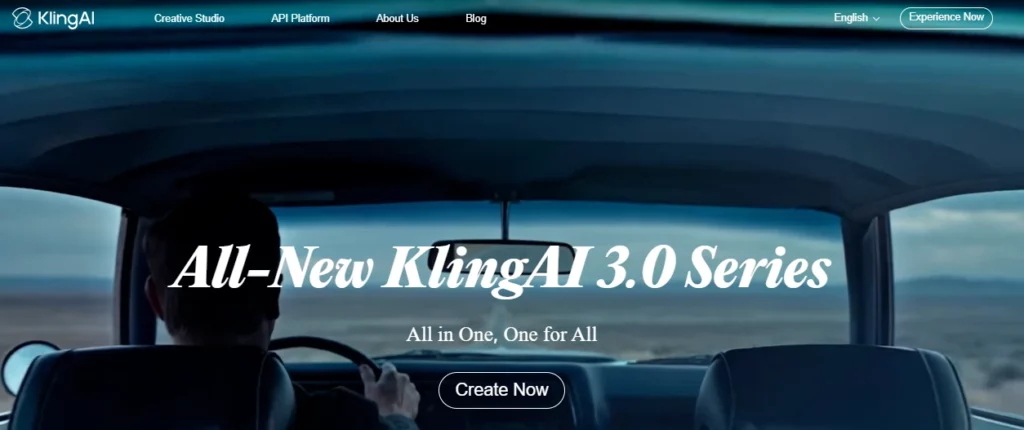
Kling AI είναι η ισχυρότερη πρώτη επιλογή αν χρησιμοποιούσατε το Sora για κινηματογραφικά κλιπ μετατροπής κειμένου σε βίντεο ή εικόνας σε βίντεο. Έχει σχεδιαστεί για δημιουργικό βίντεο, οπτική συνέπεια, κίνηση της κάμερας και κινηματογραφικό αποτέλεσμα σύντομης μορφής αντί για απλή επεξεργασία προτύπων.
Κουαΐσου's Η ανακοίνωση του Kling 3.0 τόνισε τη μετατροπή κειμένου σε βίντεο, εικόνας σε βίντεο, αναφοράς σε βίντεο, επεξεργασίας εντός βίντεο, πολυτροπικής εισόδου/εξόδου, βελτιωμένης συνέπειας, εγγενούς ήχου, αφήγησης πολλαπλών λήψεων και δημιουργίας βίντεο έως και 15 δευτερόλεπτα. Αυτό καθιστά το Kling έναν σοβαρό αντικαταστάτη του Sora για δημιουργούς που εξακολουθούν να θέλουν τη μαγεία του βίντεο που βασίζεται σε προτροπές.
Χρησιμοποιήστε το Kling AI για:
Kling AI Παράμετροι Αξιολόγησης
| Παράμετρος | Τι να ελέγξετε |
|---|---|
| Βέλτιστη ροή εργασίας | Κινηματογραφική μετατροπή κειμένου σε βίντεο και εικόνας σε βίντεο |
| Τύποι εισόδου | Κειμενικές υποδείξεις, εικόνες, αναφορές και, ανάλογα με την πρόσβαση στο μοντέλο, πολυτροπικές εισαγωγές |
| Στυλ εξόδου | Σύντομα κινηματογραφικά κλιπ, ρεαλιστικές σκηνές, στυλιζαρισμένη κίνηση, οπτικά στοιχεία προϊόντος |
| Επίπεδο ελέγχου | Ισχυρότερος έλεγχος κατά τη χρήση εικόνων αναφοράς, οδηγιών κάμερας, περιγραφών θεμάτων και προτροπών τύπου storyboard |
| Ταχύτητα | Καλό για σύντομα κλιπ, αλλά περιμένετε χρόνο επανάληψης αν θέλετε γυαλισμένα αποτελέσματα |
| Δημιουργική δύναμη | Οπτικός ρεαλισμός, κίνηση, κινηματογραφικό καδράρισμα, κινούμενη εικόνα |
| Χρήση μετατροπής | Ιδανικό για διαφημίσεις, hooks, γραφικά σελίδας προορισμού, αφήγηση ιστοριών προϊόντων και δοκιμές δημιουργικών σύντομων μορφών |
| παρατηρήσεις | Κόστος πίστωσης, όρια παραγωγής, όροι εμπορικής χρήσης, κανόνες υδατογραφήματος/εξαγωγής και διαφορές προγράμματος |
Καλύτερο Κλινγκ AI Στυλ προτροπής
Ο Κλινγκ λειτουργεί καλύτερα όταν υποδεικνύει τα πράγματα σαν σκηνοθέτης, όχι απλώς σαν συγγραφέας λέξεων-κλειδιών. Συμπεριλάβετε το θέμα, τη σκηνή, την κίνηση, τη γωνία της κάμερας, τον φωτισμό, την ατμόσφαιρα, την αναλογία διαστάσεων και τι δεν πρέπει να εμφανίζεται.
Παράδειγμα δομής προτροπής:
A close-up cinematic shot of a premium smartwatch on a dark glass table, soft studio lighting, slow push-in camera movement, reflections visible, modern luxury ad style, shallow depth of field, no text, no distorted hands, no extra objects.Για τη μετατροπή εικόνας σε βίντεο, ξεκινήστε με μια δυνατή εικόνα προϊόντος ή χαρακτήρα. Στη συνέχεια, περιγράψτε την κίνηση με σαφήνεια:
Animate this product image with a slow clockwise camera orbit, subtle background light movement, realistic reflections, no change to product shape, no logo distortion.Όταν ο Κλινγκ AI Είναι η καλύτερη επιλογή
Επιλέξτε το Kling αν η παλιά σας ροή εργασίας στο Sora αφορούσε τη δημιουργία πρωτότυπων σκηνών. Είναι ιδιαίτερα χρήσιμο όταν χρειάζεστε έντονα γραφικά αλλά δεν χρειάζεστε μια πλήρη σουίτα επεξεργασίας κοινωνικών δικτύων μέσα στο ίδιο εργαλείο.
Για παράδειγμα, ένας έμπορος θα μπορούσε να δημιουργήσει μια AI το προϊόν που γυρίστηκε σε Kling και, στη συνέχεια, μετακινήστε το κλιπ στο ΒΛΕΠΩ για λεζάντες, αλλαγή μεγέθους, τοποθέτηση λογότυπου και τελική μορφοποίηση κοινωνικών δικτύων.
2. OpenArt: Η καλύτερη εναλλακτική λύση Sora για storyboarding και δημιουργική προπαραγωγή
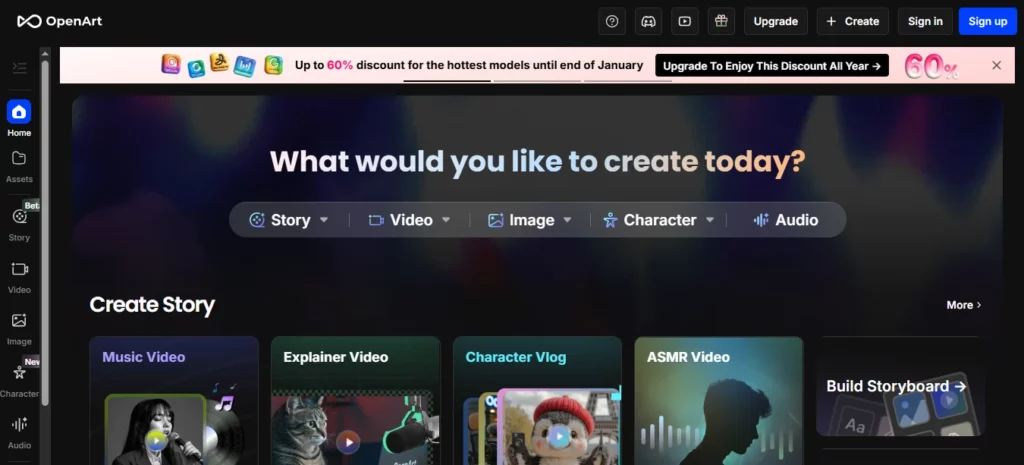
Το OpenArt είναι μια ισχυρή εναλλακτική λύση για το Sora όταν χρειάζεστε οπτικό σχεδιασμό πριν από τη δημιουργία βίντεο. Δεν πρόκειται απλώς για την αντικατάσταση του Sora clip-for-clip. Βοηθά τους δημιουργούς να αναπτύξουν έννοιες, χαρακτήρες, στυλ, σκηνές και στοιχεία που μπορούν αργότερα να γίνουν βίντεο.
OpenArt's Η λειτουργία Smart Shot είναι ιδιαίτερα σημαντική για τις ροές εργασίας αντικατάστασης Sora, επειδή εστιάζει στον σχεδιασμό λήψεων, την έξοδο πολλαπλών κοπών, την εργασία με την κάμερα, οπτική συνέπειακαι έλεγχος επεξεργασίας-πριν-δημιουργίας. Το OpenArt περιγράφει το Smart Shot ως τη δημιουργία ενός σχεδίου λήψης με storyboards και κινήσεις κάμερας, και στη συνέχεια την παραγωγή 3-5 ξεχωριστών λήψεων. Αυτό το καθιστά χρήσιμο για δημιουργούς που θέλουν περισσότερη δομή από μία τυχαία AI συνδετήρας.
Χρησιμοποιήστε το OpenArt για:
Παράμετροι αξιολόγησης OpenArt
| Παράμετρος | Τι να ελέγξετε |
|---|---|
| Βέλτιστη ροή εργασίας | Storyboarding, οπτική σύλληψη ιδεών, συνέπεια χαρακτήρων και δημιουργική προπαραγωγή |
| Τύποι εισόδου | Κειμενικές υποδείξεις, εικόνες, αναφορές χαρακτήρων, αποθηκευμένα οπτικά στοιχεία |
| Στυλ εξόδου | Εικόνες, καρέ σεναρίου, βίντεο πολλαπλών κοπών, γραφικά χαρακτήρων, έννοιες σκηνών |
| Επίπεδο ελέγχου | Ισχυρό όταν δημιουργείτε αναφορές πριν δημιουργήσετε κίνηση |
| Ταχύτητα | Καλό για να εξερευνήσετε πολλές οπτικές κατευθύνσεις πριν ξοδέψετε τους τίτλους τέλους του βίντεο |
| Δημιουργική δύναμη | Οπτική σύλληψη ιδεών, δημιουργία χαρακτήρων, σχεδιασμός storyboard, δημιουργία περιουσιακών στοιχείων |
| Χρήση μετατροπής | Χρήσιμο για σχεδιασμό διαφημίσεων, μικρογραφίες, φωτογραφίες προϊόντων, προπαραγωγή και οπτικά παρουσιάσεις πελατών |
| παρατηρήσεις | Δεν είναι πάντα το τελικό επίπεδο επεξεργασίας. Μπορεί να χρειαστείτε ακόμα VEED ή άλλο πρόγραμμα επεξεργασίας για λεζάντες και δημοσίευση. |
Πώς το OpenArt αντικαθιστά μέρος του Sora
Πολλοί δημιουργοί χρησιμοποίησαν το Sora ως μηχανή φαντασίας. Πληκτρολόγησαν μια ιδέα και είδαν πώς θα μπορούσε να μοιάζει η σκηνή. Το OpenArt μπορεί να αντικαταστήσει αυτήν την πρώιμη δημιουργική λειτουργία βοηθώντας σας να αναπτύξετε πρώτα τον οπτικό κόσμο.
Αυτό έχει σημασία επειδή οι γενιές βίντεο είναι δαπανηρές για να σπαταληθούν. Εάν η ιδέα σας είναι αδύναμη, η άμεση δημιουργία βίντεο μπορεί να κάψει τους τίτλους τέλους σε άχρηστα κλιπ. Μια καλύτερη ροή εργασίας είναι:
- Δημιουργήστε το οπτικό στυλ στο OpenArt.
- Δημιουργήστε αναφορές σε χαρακτήρες ή προϊόντα.
- Επιλέξτε τα πιο ανθεκτικά πλαίσια.
- Κίνηση αυτών των αναφορών στο Kling AI ή εργαλεία βίντεο OpenArt.
- Επεξεργαστείτε την τελική κοπή στο VEED.
Η καλύτερη ροή εργασίας OpenArt για δημιουργούς
Για μια διαφήμιση προϊόντος, δημιουργήστε πρώτα 5-10 οπτικές οδηγίες:
Στη συνέχεια, επιλέξτε την πιο δυνατή εικόνα και μετατρέψτε την σε κίνηση. Αυτό είναι πιο ελεγχόμενο από το να ζητάτε από κάποιον AI μοντέλο βίντεο για να λύσει ολόκληρη την ιδέα με ένα μόνο πλάνο.
3. HeyGen: Η καλύτερη αντικατάσταση Sora για ομιλούντα avatar και βίντεο παρουσιαστών

Το HeyGen είναι η καλύτερη εναλλακτική λύση για το Sora αν ο πραγματικός σας στόχος δεν είναι οι κινηματογραφικές σκηνές, αλλά τα βίντεο με παρουσιαστή.
Πολλές επιχειρήσεις δεν χρειάζονται ένα σουρεαλιστικό AI σκηνή βίντεο. Χρειάζονται ένα άτομο με επαγγελματική εμφάνιση που να εξηγεί ένα προϊόν, να ενσωματώνει πελάτες, να διδάσκει ένα μάθημα, να εντοπίζει ένα μήνυμα ή να μετατρέπει σενάρια σε γυαλισμένα βίντεο.
HeyGen's Τα έγγραφα περιγράφουν ροές εργασίας για φωτογραφικά avatar, δημόσια avatar και άμεσα avatar/ψηφιακά δίδυμα, με μηχανές avatar ανάλογα με την επιθυμητή ποιότητα ή χαρακτηριστικά. Υποστηρίζει επίσης ροές εργασίας για avatar και φωνή που είναι πολύ πιο κοντά στην παραγωγή επαγγελματικού βίντεο από ό,τι κινηματικός AI γενεά.
Χρησιμοποιήστε το HeyGen για:
Παράμετροι αξιολόγησης HeyGen
| Παράμετρος | Τι να ελέγξετε |
|---|---|
| Βέλτιστη ροή εργασίας | Επιχειρηματικά βίντεο και περιεχόμενο για avatar με παρουσιαστή |
| Τύποι εισόδου | Σενάρια, avatar, φωνές, φωτογραφικά avatar, δημόσια avatar, προσαρμοσμένα avatar |
| Στυλ εξόδου | Βίντεο με ομιλητές, επεξηγηματικά βίντεο, εκπαιδευτικά βίντεο, πολύγλωσσα βίντεο με avatar |
| Επίπεδο ελέγχου | Ισχυρό για σενάριο, φωνή, επιλογή avatar και επαναλαμβανόμενες μορφές παρουσιαστή |
| Ταχύτητα | Πολύ ισχυρό για επαναλήψιμη παραγωγή επαγγελματικών βίντεο |
| Δημιουργική δύναμη | Συνέπεια παρουσιαστή, εντοπισμός τοπικών ρυθμίσεων, επικοινωνία με σενάριο |
| Χρήση μετατροπής | Ιδανικό για επεξηγητές SaaS, βίντεο σελίδας προορισμού, προσέγγιση πωλήσεων, εκπαίδευση και περιεχόμενο μαθημάτων |
| παρατηρήσεις | Συγκατάθεση για avatar, φωνητική συγκατάθεση, δικαιώματα ομοιότητας, ποιότητα προφοράς και καταλληλότητα για την επωνυμία |
Όταν η HeyGen ξεπερνά έναν κινηματογραφικό αντικαταστάτη του Sora
Επιλέξτε το HeyGen όταν το ανθρώπινο μήνυμα έχει μεγαλύτερη σημασία από τη σκηνή.
Για παράδειγμα:
Σε αυτές τις περιπτώσεις, το Kling ή το OpenArt μπορεί να είναι πολύ οπτικά και όχι αρκετά πρακτικά. Το HeyGen σας προσφέρει μια επαναλήψιμη ροή εργασίας σε στιλ στούντιο.
Καλύτερη μορφή σεναρίου HeyGen
Διατηρήστε τα σενάρια άμεσα και φυσικά:
Παράδειγμα:
«Εάν η ομάδα σας αφιερώνει ώρες ηχογραφώντας τα ίδια εκπαιδευτικά βίντεο, μπορείτε να αντικαταστήσετε αυτήν τη διαδικασία με ένα AI ροή εργασίας για το avatar. Γράψτε το σενάριο μία φορά, δημιουργήστε το βίντεο, μεταφράστε το για διαφορετικές αγορές και ενημερώστε το περιεχόμενο όταν αλλάξει το προϊόν σας.
4. ΒΛΕΠΩ: Η καλύτερη εναλλακτική λύση Sora για επεξεργασία βίντεο κοινωνικής δικτύωσης και υπότιτλους
Το VEED είναι η πρακτική αντικατάσταση του Sora για δημιουργούς που δεν ενδιαφέρονται τόσο για το raw. AI γενιά και πολλά άλλα σχετικά με τη μετατροπή των αποσπασμάτων σε βίντεο έτοιμα για δημοσίευση.
Το VEED είναι ένα διαδικτυακό πρόγραμμα επεξεργασίας βίντεο με AI εργαλεία για υπότιτλους, υπότιτλους, μετάφραση, μετατροπή κειμένου σε βίντεο, avatar, φωνητική μετάφραση, εγγραφή οθόνης, μορφοποίηση και επεξεργασία. Τα εργαλεία υποτίτλων υποστηρίζουν αυτόματους υπότιτλους και μετάφραση σε πολλές γλώσσες και AI Το πρόγραμμα δημιουργίας βίντεο μπορεί να σας βοηθήσει να δημιουργήσετε βίντεο με κλιπ, μουσική, φωνητικές εντολές, λεζάντες και κινούμενα σχέδια.
Χρησιμοποιήστε το VEED για:
Παράμετροι αξιολόγησης VEED
| Παράμετρος | Τι να ελέγξετε |
|---|---|
| Βέλτιστη ροή εργασίας | Επεξεργασία, λεζάντες, επαναχρησιμοποίηση και δημοσίευση στα μέσα κοινωνικής δικτύωσης |
| Τύποι εισόδου | Ανεβασμένα κλιπ, ηχογραφήσεις οθόνης, κλιπ που δημιουργούνται από τεχνητή νοημοσύνη, σενάρια, φωνητικές εντολές |
| Στυλ εξόδου | Βίντεο έτοιμα για κοινωνική δικτύωση, κλιπ με υπότιτλους, εκπαιδευτικά βίντεο, διαφημίσεις, επεξηγηματικά βοηθήματα |
| Επίπεδο ελέγχου | Ισχυρό για επεξεργασία, υπότιτλους, πρότυπα, μορφοποίηση και στυλ επωνυμίας |
| Ταχύτητα | Εξαιρετικό για δημιουργούς που δημοσιεύουν συχνά |
| Δημιουργική δύναμη | Λεζάντες, επεξεργασία χρονοδιαγράμματος, αλλαγή μεγέθους, βελτίωση κοινωνικών δικτύων, επαναχρησιμοποίηση |
| Χρήση μετατροπής | Ιδανικό για σύντομα hooks, διαφημίσεις βίντεο, κλιπ δημιουργών και διανομή περιεχομένου |
| παρατηρήσεις | Δεν είναι κυρίως μια γεννήτρια κινηματογραφικών έργων υψηλής ποιότητας. Χρησιμοποιήστε την με Kling ή OpenArt για πιο δυνατά γραφικά. |
Πώς ταιριάζει το VEED μετά το Sora
Το Sora θα μπορούσε να δημιουργήσει εντυπωσιακά κλιπ, αλλά το ολοκληρωμένο περιεχόμενο χρειάζεται ακόμα επεξεργασία. Τα περισσότερα βίντεο κοινωνικής δικτύωσης υψηλής απόδοσης χρειάζονται:
Το VEED έχει σχεδιαστεί για αυτό το τελικό επίπεδο παραγωγής. Μια ισχυρή ροή εργασίας μετά το Sora θα μπορούσε να μοιάζει με αυτό:
- Δημιουργία AI οπτικά στοιχεία στην Kling AI.
- Δημιουργήστε υποστηρικτικές εικόνες ή καρέ σεναρίου στο OpenArt.
- Εγγραφή ή δημιουργία τμημάτων παρουσιαστή στο HeyGen.
- Συγκέντρωση, προσθήκη λεζάντας, αλλαγή μεγέθους και εξαγωγή στο VEED.
Αυτή είναι μια καλύτερη ροή εργασίας από ό,τι περιμένατε AI γεννήτρια βίντεο για να κάνει τα πάντα.
5. InVideo AI: Η καλύτερη αντικατάσταση Sora για βίντεο προτροπής μάρκετινγκ
Στο βίντεο AI αποτελεί μια ισχυρή εναλλακτική λύση όταν θέλετε ολοκληρωμένα βίντεο μάρκετινγκ από προτροπές, σενάρια ή ιδέες περιεχομένου.
Στο βίντεο AI δεν έχει να κάνει τόσο με την επίδειξη ενός ακατέργαστου AI μοντέλο και περισσότερα σχετικά με τη μετάβαση από την ιδέα σε ένα δημοσιεύσιμο βίντεο. Είναι AI Η γεννήτρια βίντεο μπορεί να γράφει σενάρια από προτροπές, να προσθέτει γραφικά, φωνές, υπότιτλους, μουσική και άλλα στοιχεία παραγωγής. Περιλαμβάνει επίσης ροές εργασίας για AI δημιουργία βίντεο, avatar, λεζάντες, διαφημίσεις σε στυλ UGC, βίντεο προϊόντων, YouTube Shorts και πολλά άλλα.
Χρήση InVideo AI για:
Στο βίντεο AI Παράμετροι Αξιολόγησης
| Παράμετρος | Τι να ελέγξετε |
|---|---|
| Βέλτιστη ροή εργασίας | Παραγωγή βίντεο από prompt-to-video και από σενάριο σε marketing |
| Τύποι εισόδου | Προτροπές, σενάρια, ιδέες για θέματα, περιγραφές προϊόντων, λεπτομέρειες κοινού |
| Στυλ εξόδου | Δομημένα βίντεο μάρκετινγκ, διαφημίσεις στα μέσα κοινωνικής δικτύωσης, επεξηγηματικά βίντεο, λίστες, βίντεο χωρίς πρόσωπο |
| Επίπεδο ελέγχου | Ισχυρό για σενάρια, stock/AI οπτικά στοιχεία, φωνητικές εντολές, σκηνές και εντολές επεξεργασίας |
| Ταχύτητα | Εξαιρετικό για γρήγορο παραγωγή περιεχομένου και δοκιμές καμπάνιας |
| Δημιουργική δύναμη | Μετατρέποντας γρήγορα πρόχειρες ιδέες σε ολοκληρωμένα βίντεο |
| Χρήση μετατροπής | Ιδανικό για διαφημίσεις, περιεχόμενο YouTube, προωθητικές ενέργειες προϊόντων και μάρκετινγκ μικρών επιχειρήσεων |
| παρατηρήσεις | Μπορεί να σας φαίνεται λιγότερο πρωτότυπο από ένα καθαρόαιμο βίντεο με δημιουργική απόδοση, αν χρειάζεστε εξαιρετικά μοναδικά κινηματογραφικά πλάνα |
Όταν βρίσκεστε σε βίντεο AI Είναι καλύτερο από το Kling ή το OpenArt
Επιλέξτε InVideo AI όταν το επιχειρηματικό αποτέλεσμα έχει μεγαλύτερη σημασία από το ακατέργαστο οπτικό μοντέλο.
Για παράδειγμα:
Στο βίντεο AI είναι χρήσιμο επειδή σκέφτεται σε ολοκληρωμένες μορφές περιεχομένου. Αυτό διευκολύνει τους επαγγελματίες του μάρκετινγκ, τις μικρές επιχειρήσεις, τα πρακτορεία και τους δημιουργούς που χρειάζονται γρήγορο αποτέλεσμα.
Η καλύτερη στοίβα αντικατάστασης Sora για διαφορετικούς χρήστες
Για YouTubers
Χρησιμοποιήστε το OpenArt για μικρογραφίες και οπτικές έννοιες, Kling AI για σύντομα κινηματογραφικά ένθετα, InVideo AI για δομημένα προσχέδια βίντεο και VEED για υπότιτλους και τελικές επεξεργασίες.
Καλύτερη στοίβα:
Για Διαχειριστές Κοινωνικών Δικτύων
Χρησιμοποιήστε το Kling AI για κλιπ που τραβούν την προσοχή, VEED για λεζάντες και αλλαγή μεγέθους και InVideo AI για γρήγορες παραλλαγές καμπάνιας.
Καλύτερη στοίβα:
Για Μεσίτες
Χρησιμοποιήστε το OpenArt για ιδέες-πελάτες, Kling AI για οπτικές δοκιμές, HeyGen για επεξηγηματικούς σκοπούς και VEED για την τελική παράδοση με επώνυμα προϊόντα.
Καλύτερη στοίβα:
Για δημιουργούς μαθημάτων και εκπαιδευτικούς
Χρησιμοποιήστε το HeyGen για μαθήματα με παρουσιαστή και το VEED για επεξεργασία, λεζάντες και μεταφράσεις. Χρησιμοποιήστε το OpenArt μόνο όταν χρειάζεστε προσαρμοσμένα γραφικά μαθήματος.
Καλύτερη στοίβα:
Πώς να Ανακατασκευάσετε το AI Ροή εργασίας βίντεο μετά τη Sora
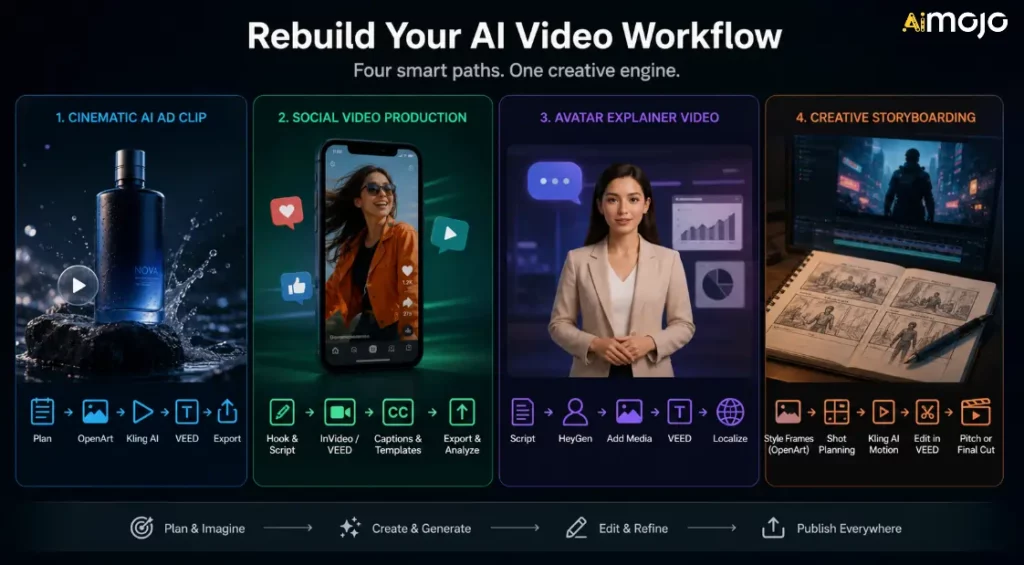
Μην επιλέγετε απλώς μία αντικατάσταση ελπίζοντας ότι θα λύσει τα πάντα. Δημιουργήστε μια ροή εργασίας γύρω από τον τύπο περιεχομένου που δημοσιεύετε.
Ροή εργασίας 1: Κινηματογραφική AI Διαφημιστικό κλιπ
Χρησιμοποιήστε αυτό όταν χρειάζεστε σύντομες οπτικές διαφημίσεις, φωτογραφίες προϊόντων ή AI Β-ρολό.
- Σχεδιάστε τη σκηνή και στοχεύστε στο συναίσθημα.
- Δημιουργήστε οπτικά στοιχεία αναφοράς στο OpenArt.
- Κινήστε το ισχυρότερο καρέ στο Kling AI.
- Προσθέστε λεζάντες, CTA και αλλάξτε μέγεθος στο VEED.
- Εξαγωγή εκδόσεων για TikTok, Reels, YouTube Shorts και διαφημίσεις.
Ροή εργασίας 2: Παραγωγή βίντεο κοινωνικής δικτύωσης
Χρησιμοποιήστε αυτό όταν ο στόχος σας είναι ο όγκος και η συνέπεια.
- Γράψτε ένα σύντομο σενάριο και ένα αφηγηματικό αφιέρωμα.
- Δημιουργήστε ένα προσχέδιο στο InVideo AI ή VEED.
- Προσθέστε λεζάντες και επώνυμα πρότυπα.
- Εξαγωγή πολλαπλών αναλογιών διαστάσεων.
- Παρακολουθήστε ποια hooks έχουν την καλύτερη απόδοση.
Ροή εργασίας 3: Βίντεο επεξήγησης Avatar
Χρησιμοποιήστε το όταν χρειάζεστε εκπαίδευση, πωλήσεις ή εκπαιδευτικά βίντεο.
- Γράψτε ένα σαφές σενάριο.
- Δημιουργήστε τον παρουσιαστή στο HeyGen.
- Προσθέστε στιγμιότυπα οθόνης, διαφάνειες ή δευτερεύοντα βίντεο προϊόντων.
- Επεξεργασία και λεζάντα στο VEED.
- Τοπική προσαρμογή μόνο μετά την έγκριση της κύριας έκδοσης.
Ροή εργασίας 4: Δημιουργική δημιουργία σεναρίου
Χρησιμοποιήστε αυτό κατά την ανάπτυξη μιας διαφήμισης, μιας ιδέας ταινίας, ενός μουσικού βίντεο ή μιας καμπάνιας επωνυμίας.
- Δημιουργήστε πλαίσια στυλ στο OpenArt.
- Χρησιμοποιήστε το Smart Shot ή τον σχεδιασμό σεναρίου όπου είναι χρήσιμο.
- Δημιουργήστε κλιπ κίνησης με την Kling AI.
- Συναρμολογήστε την πρόχειρη κοπή στο VEED.
- Χρησιμοποιήστε το αποτέλεσμα ως παρουσίαση, δημιουργική κατεύθυνση ή τελικό σύντομο στοιχείο.
Τι να κάνετε αν χρησιμοποιήσατε το Sora
Αν έχετε ακόμα περιουσιακά στοιχεία Sora, κάντε τα εξής τώρα:
Ο στόχος δεν είναι να αναδημιουργηθεί ακριβώς η Sora. Ο στόχος είναι να συνεχιστεί η παραγωγή χωρίς να εξαρτάται από ένα προϊόν που έχει διακοπεί.
Συνηθισμένα λάθη που πρέπει να αποφεύγετε
Λάθος 1: Αντικατάσταση του Sora με μια άλλη εύθραυστη ροή εργασίας
Sora's Η διακοπή λειτουργίας είναι μια υπενθύμιση για να διατηρείτε οργανωμένες τις εξαγωγές, τις προτροπές, τις εικόνες πηγής, τις λεζάντες και τα τελικά αρχεία. Μην αφήνετε ολόκληρο το σύστημα περιεχομένου σας να βρίσκεται μέσα σε μία κλειστή πλατφόρμα.
Λάθος 2: Αγνόηση της αδειοδότησης
AI Η αδειοδότηση βίντεο μπορεί να είναι περίπλοκη. Να ελέγχετε πάντα τους όρους εμπορικής χρήσης πριν από τη χρήση. AI κλιπ σε διαφημίσεις, καμπάνιες πελατών, προϊόντα επί πληρωμή, δημιουργία εσόδων από το YouTube ή δημόσια εργασία επωνυμίας.
Λάθος 3: Ξεχνώντας το επίπεδο επεξεργασίας
AI Η δημιουργία βίντεο είναι μόνο ένα μέρος της παραγωγής βίντεο. Οι υπότιτλοι, ο ρυθμός, οι περικοπές, τα σημεία αναφοράς, η αλλαγή μεγέθους, οι μικρογραφίες και τα CTA εξακολουθούν να καθορίζουν εάν ένα βίντεο θα έχει απόδοση.
Λάθος 4: Επιλογή του εργαλείου με την καλύτερη επίδειξη
Τα αποσπάσματα επίδειξης δεν αποτελούν τη ροή εργασίας σας. Δοκιμάστε τα εργαλεία με την πραγματική σας προτροπή, προϊόν, κοινό, αναλογία διαστάσεων και πρόγραμμα δημοσίευσης.
Λάθος 5: Δεν αποθηκεύετε τα δεδομένα σας
Αποθηκεύστε προτροπές, αναφορές, τελικά αποσπάσματα, λεζάντες, μικρογραφίες και ρυθμίσεις εξαγωγής. Αυτό διευκολύνει την εναλλαγή μεταξύ εργαλείων σε περίπτωση που μια άλλη πλατφόρμα αλλάξει την τιμολόγηση ή τη διαθεσιμότητα.
Συχνές ερωτήσεις σχετικά με τις εναλλακτικές λύσεις Sora
Είναι ακόμα διαθέσιμος ο Σόρα;
ΑνοικτόAI διέκοψε τις εμπειρίες ιστού και εφαρμογών Sora στις 26 Απριλίου 2026. Το Sora API έχει προγραμματιστεί να διακοπεί στις 24 Σεπτεμβρίου 2026.
Γιατί έκλεισε η Σόρα;
OpenAI's Η επίσημη σελίδα βοήθειας επιβεβαιώνει τις ημερομηνίες τερματισμού λειτουργίας, αλλά δεν παρέχει λεπτομερή δημόσια εξήγηση για κάθε εσωτερικό λόγο. Δημόσια αναφορά από την Axios ανέφερε ότι το OpenAI περιόριζε την εστίαση και τους ανθρώπινους/υπολογιστικούς πόρους, με το Sora να καταναλώνει σημαντικό υπολογιστικό κόστος. Για τους δημιουργούς, το σημαντικό είναι ότι το Sora δεν αποτελεί πλέον ασφαλές εργαλείο για νέες ροές εργασίας παραγωγής.
Ποια είναι η καλύτερη αντικατάσταση του Sora;
Kling AI είναι η καλύτερη πρώτη επιλογή για κινηματογραφική προβολή AI δημιουργία βίντεο. Το OpenArt είναι καλύτερο για storyboards και οπτικές ιδέες. Το HeyGen είναι καλύτερο για AI avatars. Το VEED είναι καλύτερο για λεζάντες και επεξεργασία κοινωνικών δικτύων. InVideo AI είναι καλύτερο για ροές εργασίας άμεσης δημιουργίας βίντεο μάρκετινγκ.
Ποια είναι η καλύτερη εναλλακτική λύση Sora για μετατροπή κειμένου σε βίντεο;
Για κινηματογραφική μετατροπή κειμένου σε βίντεο, ξεκινήστε με το Kling AI. Εάν η ανάγκη σας για μετατροπή κειμένου σε βίντεο αφορά περισσότερο βίντεο μάρκετινγκ, διαφημίσεις στα μέσα κοινωνικής δικτύωσης ή πλήρη δομή βίντεο, το InVideo AI ή το VEED μπορεί να είναι πιο χρήσιμο.
Ποια είναι η καλύτερη εναλλακτική λύση Sora για μετατροπή εικόνας σε βίντεο;
Kling AI είναι μια ισχυρή επιλογή για κίνηση εικόνας σε βίντεο. Το OpenArt είναι επίσης χρήσιμο όταν θέλετε να δημιουργήσετε ή να προετοιμάσετε τα οπτικά στοιχεία πριν τα ζωντανέψετε.
Ποια είναι η καλύτερη αντικατάσταση του Sora για επιχειρήσεις;
Για επιχειρηματικά βίντεο, το HeyGen είναι ισχυρό για επεξηγήσεις και εκπαίδευση για avatar. Το VEED είναι ισχυρό για επεξεργασία και λεζάντες. InVideo AI είναι ισχυρό για προωθητικές ενέργειες προϊόντων και βίντεο μάρκετινγκ.
Θα πρέπει να δημιουργήσω εργαλεία γύρω από το API Sora;
Όχι. Επειδή το API Sora έχει προγραμματιστεί να διακοπεί, οι δημιουργοί και οι προγραμματιστές θα πρέπει να αποφεύγουν την κατασκευή νέων μακροπρόθεσμων συστημάτων παραγωγής γύρω από αυτό.
Μπορώ να χρησιμοποιήσω AI εναλλακτικές λύσεις βίντεο για εμπορική εργασία;
Συχνά ναι, αλλά ελέγξτε κάθε πλατφόρμα's σχέδιο, άδεια χρήσης και κανόνες χρήσης. Τα εμπορικά δικαιώματα μπορεί να εξαρτώνται από το μοντέλο, τον τύπο εξόδου, το επίπεδο σχεδίου, τα περιουσιακά στοιχεία μετοχών, τη φωνή, το avatar ή τη χώρα.
Τι πρέπει να κάνω με το παλιό περιεχόμενο του Sora;
Εξαγάγετε το, αρχειοθετήστε τα μηνύματα προτροπής και τα στοιχεία αναφοράς, οργανώστε τα τελικά κλιπ και μετακινήστε την ενεργή παραγωγή σε εργαλεία που εξακολουθούν να είναι διαθέσιμα.
Το AiMojo προτείνει:
Ετυμηγορία
Για κινηματογραφική AI βίντεο, ξεκινήστε με Kling AIΓια storyboards, χαρακτήρες και δημιουργική προπαραγωγή, χρησιμοποιήστε OpenArtΓια επεξηγηματικά βίντεο για avatar και πολύγλωσσα βίντεο παρουσιαστών, χρησιμοποιήστε HeyGenΓια υπότιτλους, επεξεργασία κοινωνικών δικτύων και επαναχρησιμοποίηση, χρησιμοποιήστε το VEED. Για ροές εργασίας βίντεο με δυνατότητα άμεσης μετατροπής σε βίντεο μάρκετινγκ, χρησιμοποιήστε την Τεχνητή Νοημοσύνη InVideo.
Ο Σόρα έσπρωξε AI βίντεο προς τα εμπρός, αλλά οι δημιουργοί χρειάζονται εργαλεία που μπορούν να χρησιμοποιήσουν σήμερα. Δημιουργήστε την επόμενη ροή εργασίας σας γύρω από τη διαθεσιμότητα, την αδειοδότηση, την ποιότητα εξόδου, την προσαρμογή στη ροή εργασίας και την ταχύτητα δημοσίευσης.



 BONUS: Πάρτε τα 200 δολάρια μας "AI «Εργαλειοθήκη Mastery» ΔΩΡΕΑΝ όταν εγγραφείτε!








