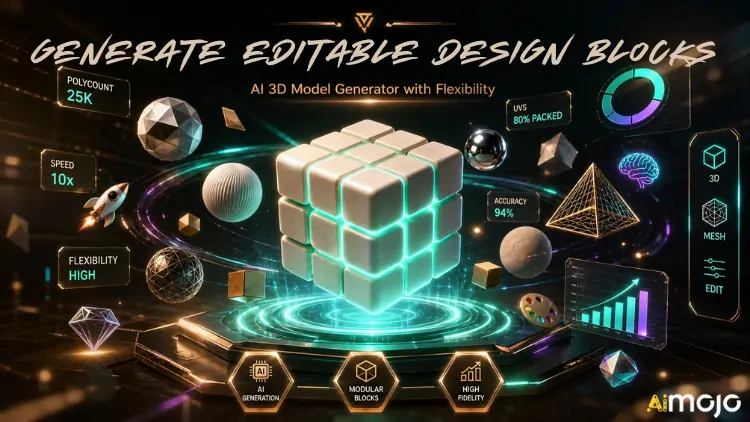
Για νέες δημιουργικές ροές εργασίας, τα στοιχεία πρέπει να είναι ευέλικτα και ευέλικτα σε όλα τα έργα και σε όλες τις φάσεις παραγωγής. Οι σχεδιαστές μπορούν να χρησιμοποιήσουν τα ευέλικτα τρισδιάστατα περιβάλλοντα που δημιουργούνται από εύκολα επεξεργάσιμα μπλοκ σχεδίασης για να αποφύγουν την ανάγκη για διπλότυπα μοντέλα σχεδίασης.
Τέτοια αρθρωτά στοιχεία υποστηρίζουν ταχύτερες αναθεωρήσεις, μεγαλύτερη ευελιξία προσαρμογής και επαναχρησιμοποίηση πόρων. Με το Tripo 3D, αυτή η διαδικασία είναι αυτοματοποιημένη και δημιουργούνται δομημένα τρισδιάστατα στοιχεία από οπτικές αναφορές και περιγραφές. Τα κλιμακώσιμα στοιχεία βοηθούν στην υποστήριξη της ποιότητας και της συνέπειας σε όλη την ανάπτυξη καθώς εξελίσσονται οι απαιτήσεις του έργου.
Τι είναι τα επεξεργάσιμα μπλοκ σχεδίασης;
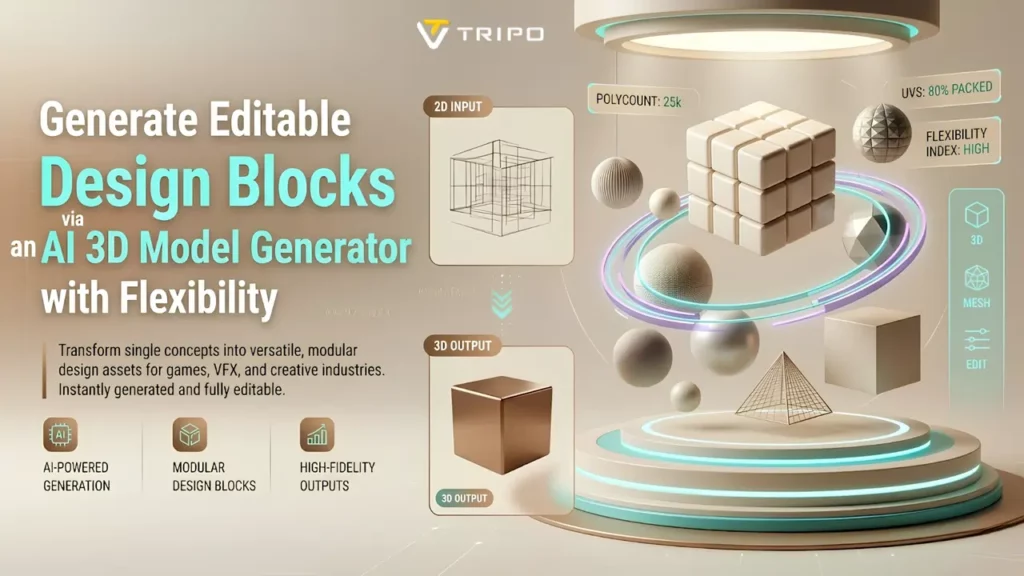
Τα επεξεργάσιμα μπλοκ σχεδίασης είναι αρθρωτά τρισδιάστατα στοιχεία που μπορούν να επαναχρησιμοποιηθούν και να τροποποιηθούν. Λειτουργούν ως δομικά στοιχεία που μπορούν να προσαρμοστούν σε διαφορετικές σκηνές, προϊόντα και οπτικές έννοιες. Η ευελιξία είναι σημαντική επειδή οι απαιτήσεις παραγωγής ενδέχεται να αλλάξουν κατά την ανάπτυξη.
Οι επαναχρησιμοποιήσιμες δομές μειώνουν τις απαιτήσεις ανακατασκευής και υποστηρίζουν αποτελεσματικές επαναλήψεις σχεδιασμού. Το Tripo 3D βοηθά στην οργάνωση των πόρων με τρόπο που απλοποιεί τις μεταγενέστερες τροποποιήσεις. Αυτά τα στοιχεία μπορούν να βελτιώσουν την επεκτασιμότητα του έργου, επιτρέποντας στους σχεδιαστές να προσθέτουν περισσότερες σκηνές αποτελεσματικά. Βελτιώνουν επίσης τη δημιουργική ευελιξία επιτρέποντας την αλλαγή μεμονωμένων εξαρτημάτων χωρίς τροποποίηση ολόκληρης της συναρμολόγησης.
Δημιουργία αρθρωτών βιβλιοθηκών περιουσιακών στοιχείων με το Tripo 3D
Τρίπο 3D's Τα εργαλεία δημιουργίας επιτρέπουν στους χρήστες να δημιουργούν συλλογές επαναχρησιμοποιήσιμων πόρων αποτελεσματικά. Οι σχεδιαστές μπορούν να δημιουργούν στοιχεία από προτροπές, σκίτσα ή οπτικές αναφορές και να τα αποθηκεύουν για επαναχρησιμοποίηση. Η πλατφόρμα υποστηρίζει την αποτελεσματική ανάπτυξη συνεπών ενοτήτων για πολλαπλά έργα.
An AI Γεννήτρια τρισδιάστατων μοντέλων βοηθά στην ανάπτυξη δομημένων πόρων με οργανωμένη γεωμετρία. Ένα άλλο πλεονέκτημα της δημιουργίας βάσει εικόνας είναι ότι παρέχει μια πρόσθετη μέθοδο για τη δημιουργία πόρων σε όλες τις ροές εργασίας. Τα κεντρικά πόρους βελτιώνουν την αποτελεσματικότητα της διαχείρισης και απλοποιούν τις ενημερώσεις σχεδιασμού σε πολλαπλές παραγωγές.
Πλεονεκτήματα των επεξεργάσιμων στοιχείων που δημιουργούνται από τεχνητή νοημοσύνη
Τα στοιχεία που δημιουργούνται από την τεχνητή νοημοσύνη μπορούν να βελτιστοποιήσουν τη δημιουργία περιεχομένου, υποστηρίζοντας παράλληλα σταθερά πρότυπα ποιότητας. Η αυτοματοποιημένη δημιουργία μειώνει τις επαναλαμβανόμενες εργασίες μοντελοποίησης, επιτρέποντας ταχύτερες τροποποιήσεις και πιο αποτελεσματική προσαρμογή μέσω δομημένης γεωμετρίας.
Οι ομάδες μπορούν να δημιουργήσουν πολλαπλά σχέδια χωρίς να χρειάζεται να ανακατασκευάσουν στοιχεία από την αρχή. Υποστηρίζει αποτελεσματική μετατροπή εικόνας σε 3D που μπορεί να χρησιμοποιηθεί ως επαναχρησιμοποιήσιμα στοιχεία. Η σταθερή ποιότητα πλέγματος μπορεί να υποστηρίξει ροές εργασίας κατάντη, ενώ οι διευρυμένες επιλογές προσαρμογής βοηθούν τις ομάδες να προσαρμοστούν στις μεταβαλλόμενες απαιτήσεις και τους δημιουργικούς στόχους.

Βήματα για τη δημιουργία επεξεργάσιμων μπλοκ σχεδίασης μέσω ενός AI Γεννήτρια τρισδιάστατων μοντέλων για ευελιξία
Βήμα 1: Εισαγωγή αναφορών για αρθρωτά σχέδια
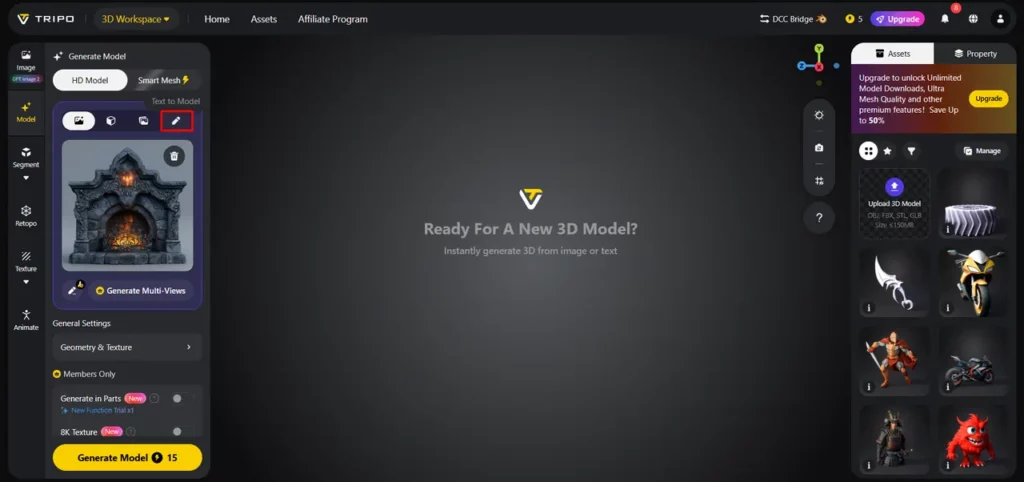
- Αρχικά, πρέπει να αποκτήσετε πρόσβαση στο Tripo 3D και να εγγραφείτε. Στη συνέχεια, μεταβείτε στο "Μοντέλο" καρτέλα που υπάρχει στην κάθετη αριστερή γραμμή μενού.
- Κάτω από το μενού, κάντε κλικ στο «Μοντέλο HD»Μπορείτε να δημιουργήσετε το μοντέλο είτε χρησιμοποιώντας την προτροπή κειμένου είτε μέσω μεταφόρτωσης εικόνας.
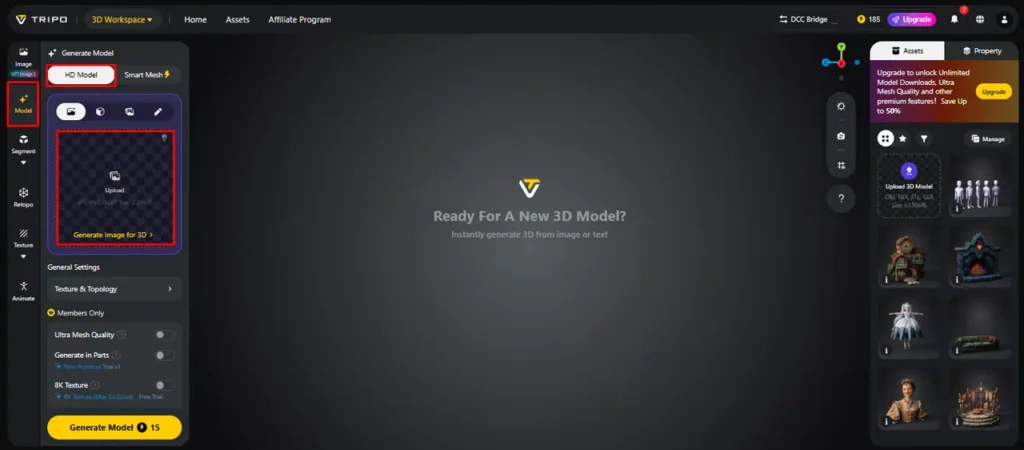
- Μπορείτε να κάνετε μεταφορά και απόθεση για να ανεβάσετε την εικόνα ή μπορείτε επίσης να ανεβάσετε την εικόνα από μια συγκεκριμένη τοποθεσία της συσκευής σας χρησιμοποιώντας η «Μεταφόρτωση» Tab.
- Αν δεν έχετε εικόνα, κάντε κλικ στο «Κείμενο σε μοντέλο» καρτέλα για να δημιουργήσετε το μοντέλο χρησιμοποιώντας μια περιγραφική προτροπή κειμένου.
Βήμα 2: Προσαρμόστε τη δομή για εύκολη επεξεργασία
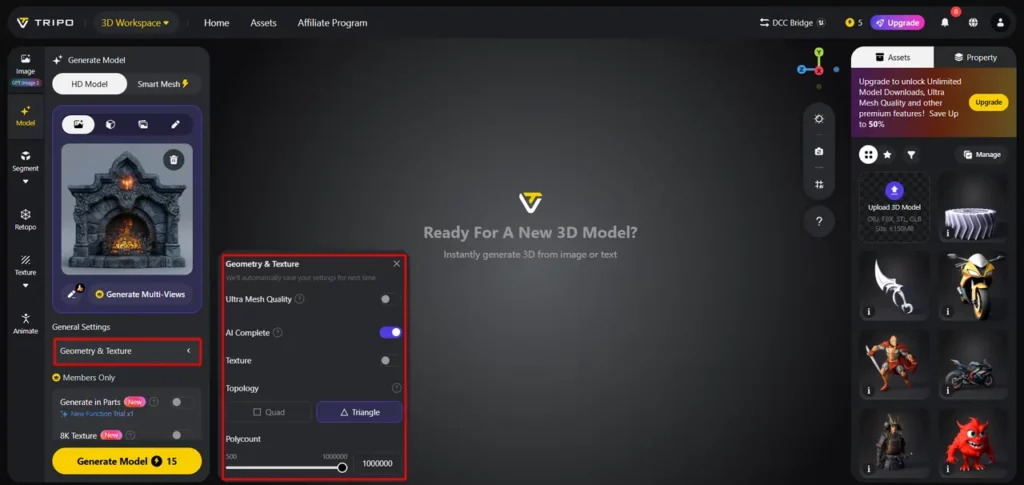
- Σύμφωνα με το "Γενικές Ρυθμίσεις" καρτέλα, μπορείτε είτε να επιτρέψετε την AI να παράγει εντελώς μόνο του αλλάζοντας "AI πλήρης"Ή μπορείτε να ενεργοποιήσετε την υφή και να επιλέξετε την προσαρμοσμένη «Ποιότητα υφής» όπως 2K, 4K ή 8K.
- Μπορείτε επίσης να ενεργοποιήσετε «PBR» για ακριβείς ανακλαστικές ιδιότητες υλικού.
- Για καλύτερα χαρακτηριστικά τοπολογίας, επιλέξτε είτε "Τετράδυμο" or "Τρίγωνο" τοπολογία.
- Μπορείτε επίσης να ορίσετε τον προσαρμοσμένο πολυαριθμό.
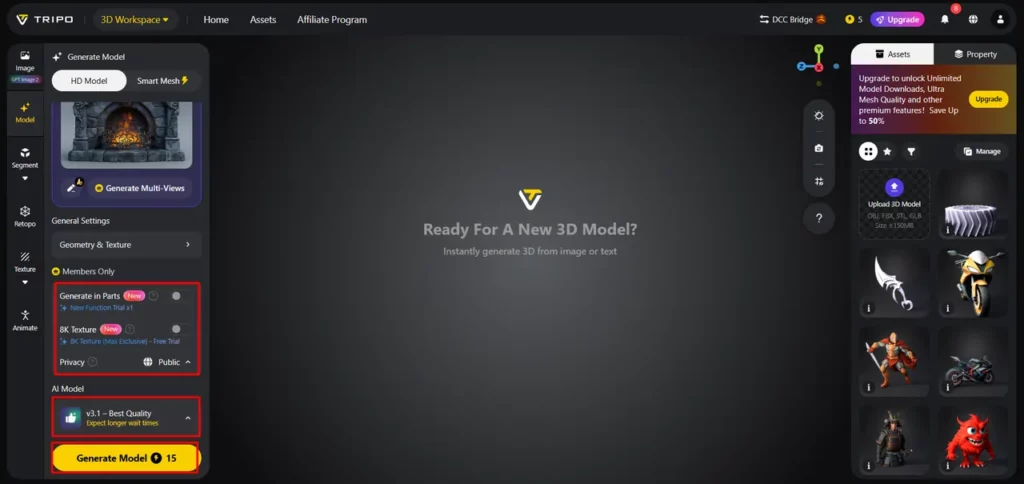
- Αργότερα, επιλέξτε το μοντέλο από τη λίστα, συμπεριλαμβανομένων των v3.1 καλύτερης ποιότητας, v3.0 γρήγορη και ισορροπημένη ή v2.5 legacy.
- Αν είστε μέλος, τότε μπορείτε να επιλέξετε «Δημιουργία σε μέρη», «Υφή 8K»και "Μυστικότητα" επιλογές.
- Τέλος, κάντε κλικ στο «Δημιουργία μοντέλου» για να ξεκινήσει η γενιά.
Βήμα 3: Αναθεώρηση και εξαγωγή επεξεργάσιμων στοιχείων ενεργητικού
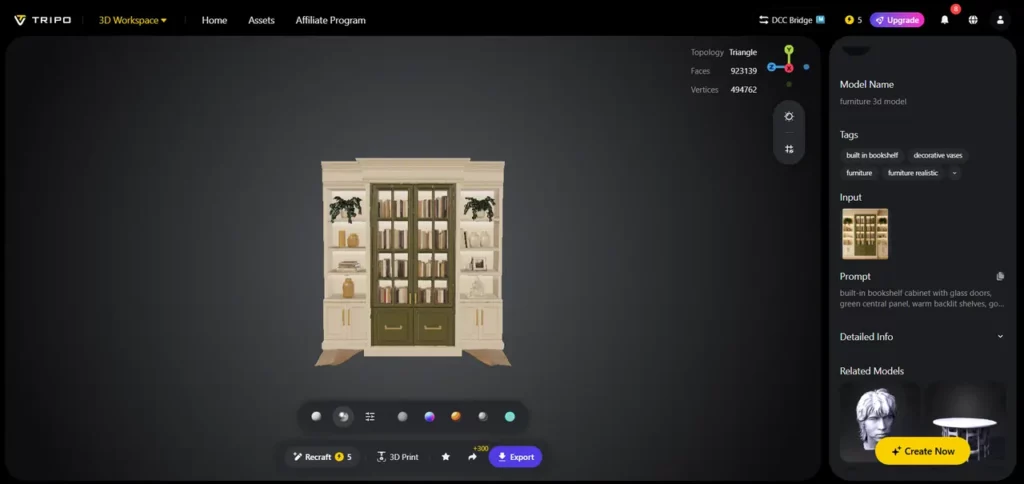
- Το Tripo 3D επιτρέπει την πλήρη προβολή του μοντέλου σε στυλ όπως «Στερεά θέα», «Στυλ κινουμένων σχεδίων», «Στυλ σκίτσου», «Στυλ ολογράμματος»και «Αφωτισμένο» φόρμα. Μπορείτε επίσης να "Εκκαθαρίζω" το σχέδιο απευθείας από το κάτω μενού.
- Μπορείτε επίσης να επεξεργαστείτε το «Ρυθμίσεις περιβάλλοντος» και τις ρυθμίσεις της κάμερας μέσω «Επαναφορά κάμερας».
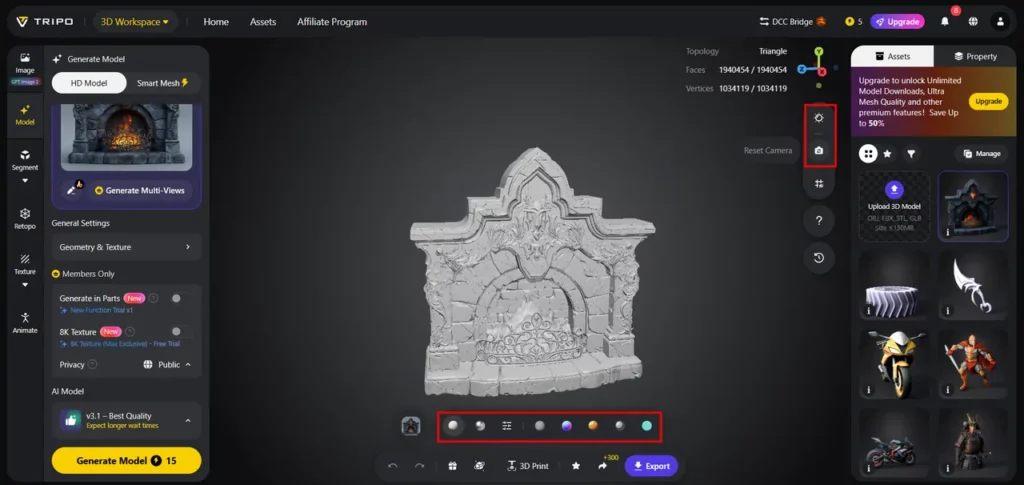
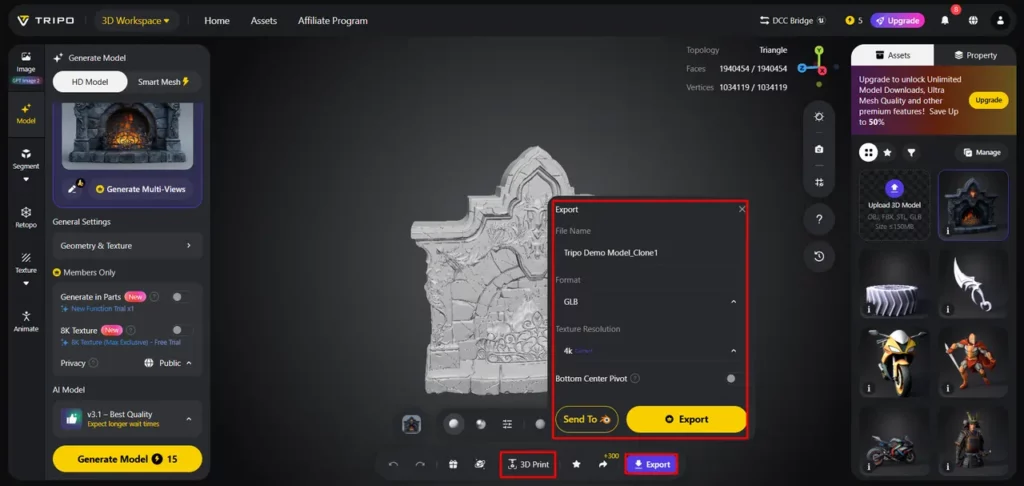
- Εάν χρειάζεται, μπορείτε να εκτυπώσετε το σχέδιο σε 3D ή να το κοινοποιήσετε απευθείας κάνοντας κλικ «Τρισδιάστατη εκτύπωση».
- Στο τέλος, κάντε κλικ στο "Εξαγωγή" από το κάτω μενού. Στη συνέχεια, επιλέξτε την ανάλυση, τη μορφή και το όνομα αρχείου και κάντε ξανά κλικ στο "Εξαγωγή" για να αποθηκεύσετε το σχέδιο στην τοπική σας συσκευή.
Δόμηση μπλοκ σχεδιασμού για μέγιστη επαναχρησιμοποίηση
Ακολουθούν μερικές καλές επαναχρησιμοποιήσιμες βιβλιοθήκες περιουσιακών στοιχείων:
Διατήρηση της δυνατότητας επεξεργασίας μέσω καθαρής γεωμετρίας
Η διατήρηση καθαρής γεωμετρίας παραμένει σημαντική για τη μακροπρόθεσμη ευελιξία των πόρων και τις ροές εργασίας κατάντη. Η οργανωμένη τοπολογία επιτρέπει ταχύτερες αλλαγές και μειώνει τα προβλήματα κατά την επεξεργασία. Τα δομημένα πλέγματα βοηθούν στη βελτίωση των διαδικασιών βελτίωσης και στη μείωση των τεχνικών προβλημάτων κατά τις ενημερώσεις πόρων.
Τα μοντέλα που δημιουργούνται από το Tripo 3D περιλαμβάνουν δομημένη γεωμετρία και τοπολογία για ευκολότερη διαχείριση περιουσιακών στοιχείων. Οι καλά οργανωμένες δομές περιουσιακών στοιχείων μπορούν να υποστηρίξουν ροές εργασίας κινούμενων σχεδίων και rigging, βελτιώνοντας παράλληλα τη συμβατότητα με λογισμικό βιομηχανικών προτύπων. Η καθαρή γεωμετρία βοηθά στη διατήρηση της επαναχρησιμοποιήσιμης και προσαρμόσιμης ικανότητας των περιουσιακών στοιχείων σε μελλοντικές φάσεις του έργου.
Μόχλευση AI Υφή για ευέλικτη προσαρμογή περιουσιακών στοιχείων
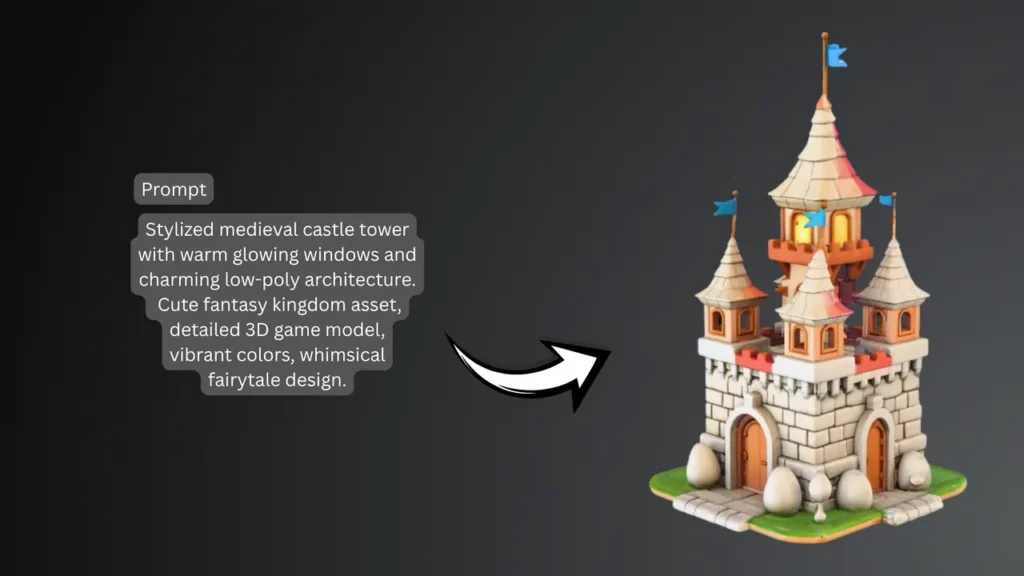
Η ποιοτική δημιουργία υφών βελτιώνει την επαναχρησιμοποίηση των μπλοκ σχεδίασης σε διαφορετικές εφαρμογές. Το Tripo 3D περιλαμβάνει ένα προηγμένο σύστημα δημιουργίας υφών για τη δημιουργία ρεαλιστικών υλικών και λεπτομερειών επιφάνειας. Οι ευέλικτες παραλλαγές υφής είναι ιδιαίτερα χρήσιμες όταν συνδυάζονται με μια ροή εργασίας μετατροπής κειμένου σε τρισδιάστατο μοντέλο.
Διαφορετικά οπτικά στυλ μπορούν να εφαρμοστούν χωρίς ανακατασκευή της γεωμετρίας. Οι πολλαπλές επιλογές υφής απλοποιούν την προσαρμογή των στοιχείων για διαφορετικές απαιτήσεις επωνυμίας, παρουσιάσεις ή καλλιτεχνικά στυλ. Αυτή η προσαρμοστικότητα βοηθά στη διατήρηση της συνέπειας κατά τη διάρκεια των κύκλων ανάπτυξης και διατηρεί τα έργα σχετικά.
Ενσωμάτωση επεξεργάσιμων μπλοκ σε αγωγούς παραγωγής
Τα επεξεργάσιμα μπλοκ σχεδίασης είναι χρήσιμα σε πολλά επαγγελματικά περιβάλλοντα παραγωγής. Τα επαναχρησιμοποιήσιμα στοιχεία μπορούν να επιταχύνουν τη δημιουργία επιπέδων και την ανάπτυξη περιβάλλοντος για έργα παιχνιδιών. Αυτό παρέχει ένα ευέλικτο πλαίσιο για ροές εργασίας οπτικοποίησης προϊόντων και απλοποιεί την παρουσίαση και την επανάληψη της ιδέας.
Τα έργα αρχιτεκτονικής οπτικοποίησης χρησιμοποιούν συχνά αρθρωτά στοιχεία για την αποτελεσματική δημιουργία διατάξεων. Δημιουργώντας και προσαρμόζοντας αποτελεσματικά στοιχεία, οι δημιουργικοί επαγγελματίες μπορούν να διατηρούν ευέλικτες ροές εργασίας σε διαφορετικούς κλάδους και εφαρμογές.
Συμπέρασμα
Τα επεξεργάσιμα μπλοκ σχεδίασης υποστηρίζουν κλιμακούμενες και προσαρμόσιμες ροές εργασίας 3D. Τα επαναχρησιμοποιήσιμα στοιχεία μπορούν να μειώσουν τις επαναλαμβανόμενες εργασίες, να υποστηρίξουν αποτελεσματικές αναθεωρήσεις και να βελτιώσουν τη συνέπεια της παραγωγής. Το Tripo 3D παρέχει λειτουργίες όπως έξυπνη δημιουργία, δομημένη γεωμετρία, προηγμένη υφή και ευέλικτες δυνατότητες εξαγωγής για τη δημιουργία αρθρωτών στοιχείων.
Αυτές οι δυνατότητες επιτρέπουν στους δημιουργούς να αναπτύσσουν πόρους για διαφορετικά έργα και μεταβαλλόμενες απαιτήσεις. AI Καθώς η τεχνολογία εξελίσσεται, η ευέλικτη δημιουργία τρισδιάστατου περιεχομένου μπορεί να γίνει πιο αποτελεσματική, προσβάσιμη και χρήσιμη για τη σύγχρονη ψηφιακή παραγωγή.


 BONUS: Πάρτε τα 200 δολάρια μας "AI «Εργαλειοθήκη Mastery» ΔΩΡΕΑΝ όταν εγγραφείτε!