

AskCodi Key Insights
Co je AskCodi?

Zeptejte seCodi is an AI-powered coding assistant and unified LLM gateway built for developers and engineering teams who want multi-model flexibility without vendor lock-in. Created by Assistiv.ai and trusted by over 350,000 developers worldwide, AskCodi lets you access GPT-4, Claude, Gemini, LLaMA, Mistral, DeepSeek and other large language models through a single OpenAI-compatible API endpoint.
The platform also includes an AI Tvůrce uživatelského rozhraní for rapid front-end prototyping, a custom Agent Builder with MCP tool support and a community Agent Marketplace. For businesses, AskCodi solves a critical problem: it removes the need to manage multiple AI subscriptions, separate API keys and fragmented workflows. Instead, teams operate from one shared token pool, compare model outputs side by side and switch providers with a single parameter change.

AskCodi’s chat interface lets developers query multiple AI models simultaneously. You can send the same prompt to OpenAI, Anthropic, Google and DeepSeek models, then compare responses in one view. This saves significant time during model evaluation and helps teams identify which LLM produces the best output for specific coding tasks.
The platform exposes a single API endpoint at api.askcodi.com/v1 that accepts standard OpenAI SDK calls. Developers switch between models by changing one parameter in the request body. There are no extra SDKs to install, no separate authentication flows and no rewriting of existing integrations. This is particularly valuable for teams running A/B tests across LLM providers or building fallback routing into production systems.

The browser-based UI Builder generates React components and full application layouts from nabádá přirozený jazyk. It uses Sandpack for real-time live preview, allowing developers to see rendered output instantly. Even smaller open source models can produce usable front-end code through this tool, making it useful for rapid prototyping and internal tooling.
AskCodi’s Agent Builder lets developers create production-ready AI agents with sub-agents, configurable skills and Model Context Protocol (MCP) tool integrations. Teams can define agent behaviours, attach external tools and deploy agents that perform multi-step workflows. The accompanying Agent Marketplace offers community-built agents, prompts and skill collections that install with a single click.

Official plugins cover VS Code, the full JetBrains family, Sublime Text, Neovim, Zed, Cursor and Continue.dev. A CLI tool provides terminal-based access for developers who prefer command-line workflows. Each integration supports inline completions, code refactoring, contextual chat and code review directly within the editor.
Unlike most competitors that reset your allocation monthly, AskCodi’s Flexible plans roll unused tokens forward indefinitely. This means quiet months do not waste budget, and teams can accumulate a buffer for intensive sprint periods. Combined with the shared token pool across team members, this model removes the pressure of “use it or lose it” subscriptions.
Cenové plány AskCodi
| Plán Název | Stát | Přiřazení tokenu | KLÍČOVÉ VLASTNOSTI |
|---|---|---|---|
| Zdarma | $0 | 100K one-time | 6 free models, 10 daily uses, personal use only |
| Flexible $20 | $ 16.67 / měsíc | 16 mil. / Měsíc | All models, Custom agents, rollover, team workspaces |
| Enterprise | Zvyk | Zvyk | SLA guarantees, dedicated support, centralised billing |
Getting Started With AskCodi
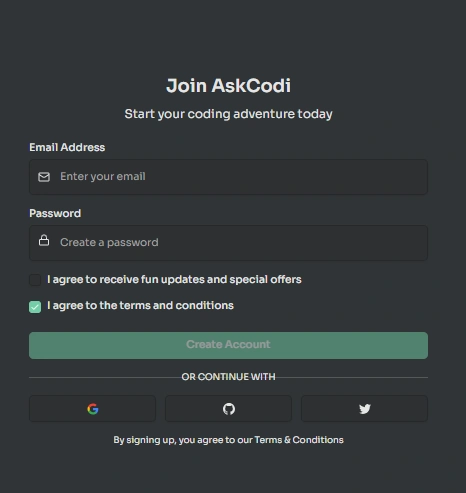
- Krok 1: Hlava do askcodi.com and sign up for a free account. You receive 100,000 tokens and access to six free LLM models immediately.
- Krok 2: Install the AskCodi extension in your preferred IDE. Official plugins are available for VS Code, JetBrains, Neovim, Sublime, Zed and Cursor through their respective marketplaces.
- Krok 3: Open the AskCodi chat panel within your editor. Select a model from the dropdown and start prompting. Try generating a function, writing a unit test or asking for a code explanation to see results in context.
- Krok 4: Prozkoumejte AI UI Builder and Agent Builder from the AskCodi web dashboard. Experiment with building a React component from a text prompt or configuring a custom agent with MCP tools from the marketplace.
AskCodi’s Agent Marketplace and MCP Ecosystem
The Agent Builder and Marketplace represent AskCodi’s push beyond simple code completion into agentic workflows. Developers can build multi-step agents that combine sub-agents, external API calls and MCP server connections. The Marketplace then allows the community to share these agents and install them with one click.
This positions AskCodi not just as a asistent kódování but as a broader AI development platform. For teams already using tools like Continue.dev or Cline, AskCodi’s agents integrate natively into those environments, making it possible to extend existing IDE-based workflows with autonomous task execution and tool orchestration.
Výhody a nevýhody
- Multi-LLM access without lock-in.
- Non-expiring token rollover.
- Shared team token pool.
- 12+ IDE and CLI integrations.
- AI UI Builder included.
- Agent Builder with MCP support.
- Bezplatná úroveň je velmi omezená.
- No published SLA or uptime guarantee.
- Token multipliers not fully transparent.
Best AskCodi Alternatives
| AI Coding Assistant & Unified LLM Gateway | Flexibilita více modelů | IDE & Editor Support |
|---|---|---|
| GitHub Copilot Business | OtevřenáAI 👔 | VS Code, JetBrains, Neovim, Xcode |
| Cursor Teams | GPT-4, Claude, Blíženci | Cursor IDE only (VS Code fork) |
| Tabnine Enterprise | Limited (GPT-3.5 focused) | VS Code, JetBrains, Neovim, Eclipse |
| Amazon Q Developer Pro | AWS models only | VS Code, JetBrains, AWS Cloud9 |


