

Прекарвате над 3 часа на ден в задачи, които една машина би могла да обработи за 3 минути. Копиране и поставяне на данни между приложения. Ръчно изпращане на последващи имейли. Форматиране на отчети на ръка. Това...'s не е работен процес — това's смилане.
Това ръководство ви показва точно как да настроите първия си не-код AI работния процес от нулата — без разработчик, без скрипт, без извинения. Докато приключите с четенето, ще имате работеща автоматизация, която можете да стартирате още днес.
Какъв No-Code AI Работният процес всъщност го прави (той's Не това, което си мислиш)
Повечето хора чуват „AI работния процес„и си представете нещо сложно. То's не.
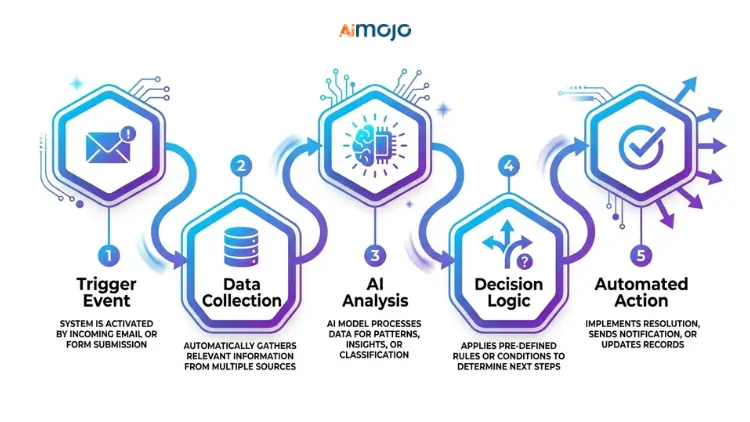
Без код AI Работният процес е свързана поредица от автоматизирани стъпки, при които AI се грижи за мисловната част — а визуален инструмент се грижи за цялата работа. Без терминал. Без синтактични грешки. Просто настройка с плъзгане и пускане, която свързва вашите приложения, задейства... AI действие и насочва изхода, където ви е необходим.
Ключовата разлика между обикновената автоматизация и AI автоматизация:
Системата за задействане на действие на разбираем език изглежда така: някой попълва вашата контактна форма → AI квалифицира потенциалния клиент → резултатът се добавя във вашия CRM автоматично, Че's без код AI работен процес, изпълняван безшумно във фонов режим.
Това е за вас, ако все още изпълнявате тези задачи ръчно
Преди да изберете инструмент, проверете дали сте в правилната стая:
Ако някое от тези неща ви е от полза, значи това ръководство е точно за вас. Не се изискват познания по програмиране.
5-те най-добри No-Code AI Инструменти за работен процес (класирани за начинаещи)
Изборът на грешен инструмент тук е загуба на часове. Тук's директно сравнение:
| Инструмент | Най-добър за | Безплатен план | AI Характеристики: |
|---|---|---|---|
| Zapier | Автоматизация от приложение към приложение | ✅ Да | Копилот (настройка на естествен език) |
| Make.com | Визуални многостъпкови потоци | ✅ Да | AI модули + HTTP маршрутизация |
| n8n | Самостоятелно хоствани разширени потоци | ✅ Да | LLM интеграции, пълна гъвкавост |
| Pabbly Connect | Бюджетно-достъпни тригери | ✅ Да | Basic AI стъпки за действие |
| Бардийн | Базиран на браузър AI остъргване | ✅ Да | Действия в браузъра, задвижвани от GPT |
Изградете първия си AI Работен процес в 6 стъпки (от началото до края)
Това е действителният процес — не обобщение, а работеща система.
Стъпка 1 — Изберете ЕДНА повтаряща се задача за автоматизиране
Не започвайте с целия си бизнес. Изберете най-досадната задача, която вършите ежедневно. Нещо, което бихте могли да опишете с едно изречение: „Всеки път, когато получа ново запитване по имейл, ръчно копирам данните в електронна таблица.“ Че's вашата цел.
Стъпка 2 — Настройте спусъка си
Тригерът е това, което стартира работния процес. Това може да бъде: ново подаване на формуляр, входящ имейл, нов ред в Google Sheets или съобщение в Slack. В Zapier или Make.com това е първият ви блок.
Стъпка 3 — Добавете вашето AI действие
Тук се случва интелигентността. Свържете се ОтворетеAI (ChatGPT), Клод или Близнаци като стъпка от действието. Задайте му данните за задействане и напишете ясна подкана. Пример: „Обобщете това запитване на клиента в 2 изречения и го класифицирайте като спешно, нормално или с нисък приоритет.“
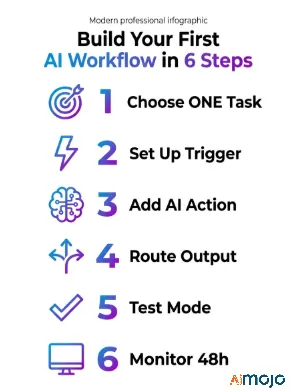
Стъпка 4 — Маршрутизиране на изхода
Кажете на работния си процес къде се намира изкуственият интелект's отговорът трябва да бъде – колона в Google Таблица, канал в Slack, чернова на имейл или Страница с понятия. Това е вашият последен блок за действие.
Стъпка 5 — Тествайте преди пускане на живо
Всяка платформа има тестов режим. Стартирайте го. Проверете дали спусъкът се задейства, AI Отговорът е логичен и резултатът се показва правилно. Поправете проблемите с подканите тук, а не след 200 изпълнения на живо.
Стъпка 6 — Наблюдавайте през първите 48 часа
Включете го и следете лог файловете за изпълнение. Повечето грешки се случват през първите два дни — обикновено от Ограничения на API, несъответствия във форматирането или неясна подкана, която води до противоречиви резултати.
7 Без код AI Работни процеси, които можете да копирате още сега
Реални случаи на употреба, а не теория:
- Автоматично обобщаване на имейли → изпращане на дайджест до Slack (чудесно за претоварени пощенски кутии)
- Отговор от Google Form → бриф, написан с изкуствен интелект → запазен в Notion
- Публикувана е нова публикация в блога → AI генерира 3 социални надписа → планирани чрез Buffer
- Изпращане на контактна форма → AI квалификация на потенциални клиенти → маркирана в CRM
- Заявка за обслужване на клиенти → AI категоризация → насочено към правилния екип
- Седмични SEO данни от Google Search Console → AI обобщен отчет → изпращан по имейл всеки понеделник
- Публикация в блога → AI пренасочване на тръбопровод → статия в LinkedIn + нишка в Twitter + чернова на имейл бюлетин
Всички те могат да се изградят в Zapier или Make.com с безплатни планове. Работен процес №7 (конвейерът за пренасочване на съдържание) сам по себе си може да спести на екип за съдържание 5+ часа седмично.
5 грешки, които ще ви развалят първия AI Работен процес (и как да го поправим)
Повечето начинаещи не се провалят, защото инструментът е труден - те се провалят заради тези пет неща:
Там's също така шеста грешка, за която никой не говори: лечение на AI стъпка като магическа кутия. Качеството на изхода е 100% обвързано с това, което влиза. Ако данните за задействане са разхвърляни - непоследователно форматиране, липсващи полета, смесени езици - AI отговорът ще отразява това. Първо почистете входните си данни, след което изградете AI заобиколи го. Правилото „боклук вътре, боклук навън“ важи тук по-силно отколкото където и да е другаде.
След като първият ви работен процес се изпълни — тук's Какво да се изгради след това
Една работеща автоматизация е доказателство за концепцията. Сега я мащабирате.
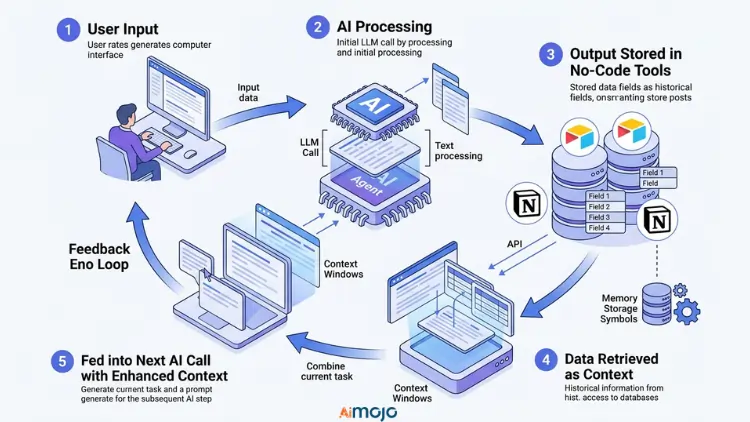
Свържете множество работни процеси в пълен стек за автоматизация — където резултатът от един поток става спусък за друг. Ето как се изграждат истински системи, а не само единични преки пътища.
Кога да надстроите от безплатно към платено: след като достигнете постоянни ограничения за задачи или се нуждаете от многопътна условна логика (Make.com)'s платените планове добавят значителна мощност за разклоняване).
Добавяне на памет и контекст към AI стъпки е следващото ниво — вместо еднократни подкани, вие съхранявате предишни резултати в Airtable или Notion и ги връщате обратно в следващото AI обаждане. Ето как се изгражда многоетапно AI агент без код, който действително да запомня контекста между изпълненията.
Пълният No-Code AI Инструментариум (Всичко необходимо е добавено към отметките)
| категория | Инструменти |
|---|---|
| Конструктори на работни потоци | Zapier, Make.com, n8n, Pabbly Connect |
| AI Портове | отвореноAI API, Клод API, Джемини API |
| За съхранение на данни | Google Таблици, Airtable, Notion |
| Източници на задействане | Gmail, Typeform, уеб кукички, Shopify |
| Мониторинг | Журнали за изпълнение на Make.com, история на задачите на Zapier |
Хората също питат: Без код AI Работни потоци
Мога ли да построя AI работен процес с нулев опит в кодирането?
Да. Инструменти като Zapier и Make.com са създадени специално за нетехнически потребители. Ако можете да плъзгате, пускате и попълвате формуляр, можете да създадете такъв.
Подходящ ли е Запир за AI автоматизация?
За начинаещи, абсолютно. Zapier Copilot ви позволява да опишете работния си процес на разбираем език и изгражда стъпките. Също така има вградени интеграции с ChatGPT и Claude.
Колко струва да се изпълни no-code? AI работен процес?
Можете да започнете безплатно както в Zapier, така и в Make.com. Основните разходи започват да се начисляват, когато превишите ограниченията за безплатно ниво или се нуждаете от платени връзки към приложения. Повечето малки работни процеси струват под $20/месец.
Какво's разликата между автоматизация без код и AI автоматизация?
Стандартната автоматизация следва фиксирани правила. AI Автоматизацията използва езиков модел за интерпретиране, генериране или класифициране на съдържание, което я прави полезна за задачи, които не са черно-бели.
Не може да се кодира AI работните процеси заместват виртуалния асистент?
За структурирани, повтарящи се задачи — да. За нюансирани човешки преценки — все още не. Те работят най-добре като умножител на силата заедно с вашия екип, а не като пълен заместител.
Първият ви работен процес трябва да е изпълнен, преди да приключите с четенето на това
Изберете една задача. Отворете Make.com или Zapier. Задайте тригер, добавете стъпка от действието ChatGPT, насочете изхода. Тествайте го. Това's него.
Най-голямата грешка не е изборът на грешен инструмент - тя's чакайки, докато всичко се почувства „перфектно“, за да започнете. Първият ви работен процес ще бъде труден. Това's Въпросът е. Създай го объркано, тествай го, поправи подканата и ще работи.
Копиране на обобщението на имейла + шаблона за работен процес в Slack


 БОНУС: Вземете нашите 200 долараAI „Набор от инструменти за майсторство“ БЕЗПЛАТНО при регистрация!



