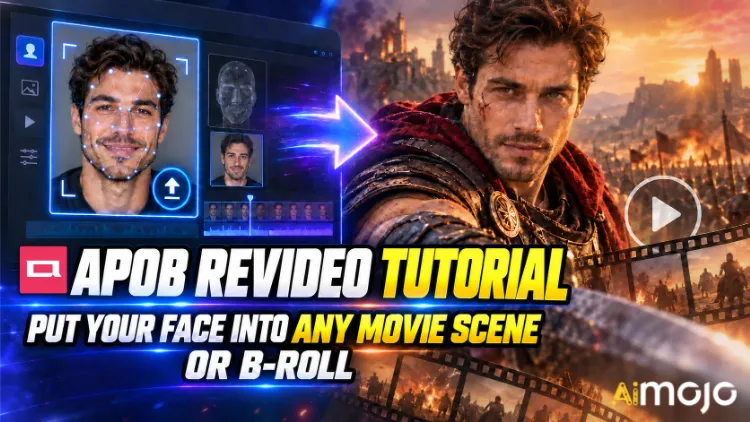
لقد شاهدت تلك المقاطع. شخص ما's وجهٌ يؤدي حركة المشي البطيئة في ممرٍ من فيلم إثارة. مُبدعٌ عشوائيٌّ يُصبح فجأةً بطلاً في إعلانٍ تجاريٍّ للسيارات، من الواضح أن تكلفة تصويره بلغت ستة أرقام. لم يستأجر أحدٌ كاميرا RED. لم يحجز أحدٌ موقع تصوير.
يُعدّ زر APOB ReVideo هو الزرّ الذي يقف وراء العديد من تلك المنشورات. ما عليك سوى تحميل مقطع قصير، وتحميل صورة مرجعية واحدة، ثم الضغط على زرّ "إنشاء"، ليتم استبدال الشخص الموجود في ذلك المقطع بشخصيتك - بنفس المشية، ونفس إيماءات اليد، ونفس زاوية الكاميرا، ونفس الخلفية. يبقى الأداء كما هو، بينما يتغير الوجه والجسم.
هذا ليس فلترًا للصق الوجه يهتز مع كل حركة للرأس. APOB AI's يعمل برنامج ReVideo بتقنية نقل الحركة Wan 2.2 Animate، ما يعني أنه يقرأ المقطع الأصلي كهيكل حركي ويعيد بناء مؤدي جديد فوقه. فرق شاسع، وستشعر به من أول مرة تختبر فيها مقطع رقص.
فيما يلي سير العمل الفعلي، وحسابات حقوق الملكية التي لا يخبرك بها أحد مسبقًا، ومقاطع المصدر التي تُسبب المشكلة، والإصلاحات التي تحول العرض غير الواضح إلى شيء قابل للنشر.
باختصار شديد — نسخة الثلاثين ثانية
| سؤال | إجابة مباشرة |
|---|---|
| ماذا يفعل؟ | يستبدل الشخصية في فيديو موجود بوجهك أو AI النموذج، الحركة سليمة |
| المحرك الذي يقف وراءه | Wan 2.2 Animate (نقل الحركة + الهوية) |
| ما تقوم بتحميله | مقطع فيديو قصير واحد + صورة مرجعية واحدة |
| التكلفة | حوالي 26 وحدة نقدية في الثانية من الإنتاج |
| حرية الوصول | ٨٠ رصيدًا مجانيًا يوميًا = حوالي ٣ ثوانٍ يوميًا، لا حاجة لبطاقة |
| طول المقطع | المقاطع القصيرة هي الأفضل. تحقق من برنامج التحميل الخاص بك.'s قم بتحديد الحد قبل الوثوق بملف طويل |
| أفضل ل | تعديلات مشاهد الأفلام، وإدراج لقطات إضافية، وإعلانات من إنشاء المستخدمين، واتجاهات الرقص، وقنوات مجهولة الهوية |
| المهارة المطلوبة | صفر. إذا كنت تستطيع تحميل ملف، فأنت مؤهل. |
ما هو فيديو APOB ReVideo في الواقع؟
يقع موقع ReVideo داخل أبوب AI مساحة عمل الفيديو إلى جانب تحويل الصور إلى فيديو، وتحريك الكاميرا، والشخصية الأفاتار الناطقة، و شفة المزامنة. فكر في الأمر على أنه وحدة "إعادة تصوير هذه اللقطات مع طاقم تمثيل مختلف".
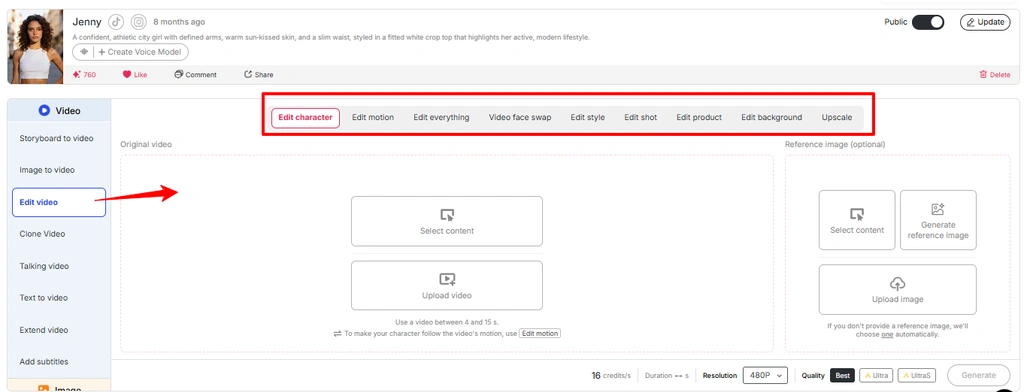
يغطي هذا المكان عدة وظائف تحت سقف واحد:
باختصار: يقوم برنامج APOB ReVideo بإعادة معالجة لقطات الفيديو الموجودة لديك بدلاً من إنشاء فيديو جديد تماماً بناءً على نص مُدخل. لهذا السبب تبدو النتيجة واقعية. أنت تستخدم قوانين الفيزياء الحقيقية من مقطع فيديو حقيقي.
ملاحظة: في أحدث واجهة لبرنامج APOB، تم دمج العديد من عمليات تحرير الفيديو ضمن قسم "تحرير الفيديو" . إذا لم يظهر خيار "إعادة الفيديو" بشكل منفصل، فيمكنك الوصول إلى نفس العملية من قسم "تحرير الفيديو".
لماذا تتفوق تقنية نقل الحركة على تقنية تحويل النص إلى فيديو؟
تُجيد تقنية تحويل النص إلى فيديو نقل الأجواء، لكنها سيئة للغاية في تصميم الحركات بدقة. جرّب أن تطلب من مُولّد نصوص عبارة "رجل يدور، يشير إلى الكاميرا، يبتسم ابتسامة ساخرة في النبضة الثالثة"، وستُجري عملية عشوائية تمامًا. أما ReVideo، فيتجاوز هذه العملية تمامًا، فالابتسامة الساخرة في النبضة الثالثة موجودة بالفعل في ملف المصدر، ويقوم النموذج ببساطة بإعادة تمثيلها.
استخدم الصورة من الوسائط "ميزة تحرير الفيديو APOB AI" وقم بتغيير النص البديل إلى "تحرير الحركة في ميزة تحرير الفيديو APOB".
بالنسبة للمبدعين الذين وجدوا بنيةً واحدةً فعّالة، فهذا هو كل ما في الأمر. مقطع واحد ناجح يتحول إلى عشرة أشكال مختلفة بعشرة وجوه مختلفة.

قبل الضغط على زر الإنشاء: قائمة التحضير الخاصة بك
أن's لا يوجد خط زمني، ولا إطارات رئيسية، ولا إخفاء، ولا تتبع بالرسوم المتحركة.
شرح خطوة بخطوة: برنامج تعليمي لإعادة إنتاج فيديو APOB
الخطوة الأولى: سجّل الدخول واحصل على رصيدك المجاني
توجه الى أبوب AI التطبيق قم بتسجيل الدخول. ستُضاف أرصدتك اليومية البالغة 80 رصيدًا إلى حسابك تلقائيًا. بمعدل 26 رصيدًا تقريبًا في الثانية، هذا's حوالي ثلاث ثوانٍ من مخرجات ReVideo المجانية يوميًا - تكفي لاختبار واحد مناسب، وليست كافية لمجموعة من الاختبارات. لذا، ضع ذلك في ميزانيتك.
👈 ميزة احترافية: لدى APOB خادم Discord نشط. خلال إطلاق الميزات الجديدة، قاموا بتوزيع حوالي 1,000 رصيد إضافي للمبدعين الذين يشاركون مقاطع الفيديو التي أنشأوها مع المجتمع. إذا كنت تخطط لإنتاج كميات كبيرة، فهذه فرصة ذهبية.
الخطوة — أنشئ شخصيتك أو حمّلها
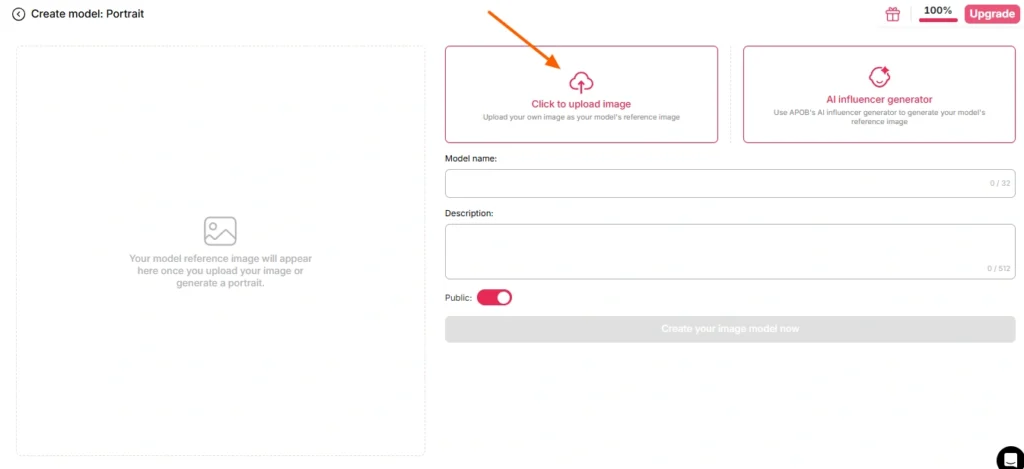
هناك مساران هنا:
الخيار أ - استخدم صورتك الشخصية. حمّل صورة واضحة، أمامية، ومضاءة جيداً. لا تستخدم نظارات شمسية، ولا ظلالاً كثيفة، ولا تشويشاً ناتجاً عن الحركة، ولا صورة جماعية حيث يتعين على العارض تخمين من تقصد.
المسار ب - بناء AI النموذج أولاً. انتقل إلى قسم إنشاء نموذج صورة شخصية وقم بإنشاء شخصية من خلال AI مولد المؤثرين. حدد الجنس، العمر، الجنسية، لون الشعر، لون العينين، والملابس. هذا هو الخيار الأمثل لأي شخص يدير قناة متكررة، لأن APOB's تضمن خاصية تثبيت الوجه ثبات الهوية عبر مئات الصور المستقبلية. شخصية واحدة، عدد لا نهائي من المقاطع، علامة تجارية مميزة.
إذا تخطيت الصورة المرجعية تمامًا، فسيستخدم APOB الصورة المحفوظة افتراضيًا. AI نموذج صورة. مفيدة، ومفاجئة أحيانًا.
الخطوة الأولى: اختر لقطاتك المصدرية
تحدد هذه الخطوة 80% من جودة الإخراج. ليس النموذج، ولا الإعدادات، بل مقطع الفيديو الأصلي.
| سمة مقطع المصدر | نتيجة |
|---|---|
| موضوع واحد واضح، إطار مركزي | ✅ تبديل نظيف |
| إضاءة ثابتة في جميع الأنحاء | ✅ لون بشرة موحد |
| حركة الجسم المرئية | ✅ قراءة الحركة بشكل صحيح |
| الشخص يسير خلف الأشياء | ⚠️ تشوهات ناتجة عن الحجب |
| تحريك سريع للكاميرا، ضبابية كثيفة | ❌ انحرافات الهوية |
| إطار مزدحم، أشخاص متعددون | ❌ النموذج يختار الهدف الخاطئ |
| جودة منخفضة، مضغوطة، أعيد تحميلها 4 مرات | ❌ فطر |
لا توجد لديك لقطات فيديو خاصة بك؟ APOB's تُنتج المولدات المدمجة - مثل "أنشئ بنفسك"، و"المجموعة الكاملة"، و"وضع الخبراء"، و"تحويل الصورة إلى فيديو" - مقطعًا يمكنك إدخاله مباشرةً في برنامج ReVideo. حلقة كاملة، منصة واحدة.
الخطوة — افتح برنامج ReVideo وقم بتحميل كلا الملفين
الشريط الجانبي الأيسر ← علامة تبويب الفيديو ← ReVideo.
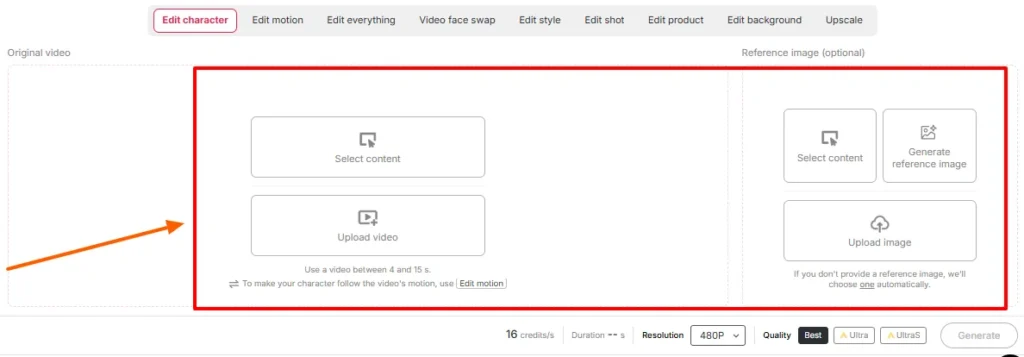
تفضل بالدخول:
تأكد من إعدادات المدة والجودة على الشاشة. تحقق من الحد الأقصى للطول الذي يعرضه مكان عملك في ذلك اليوم.'s كانت النسخة الأصلية من ReVideo تحدد مدة المقاطع بحوالي خمس ثوانٍ، بينما تُعلن الصفحات الأحدث التي تعمل بتقنية WAN عن دعمها لملفات أطول بكثير. يقول مُحمّل الملفات الحقيقة؛ فالمنشورات على المدونة تتأخر عن الإصدارات.
الخطوة — الإنشاء والانتظار
اضغط على زر الإنشاء. يقوم النموذج بربط مرجعك بأداء المصدر مع الحفاظ على ثبات الخلفية.
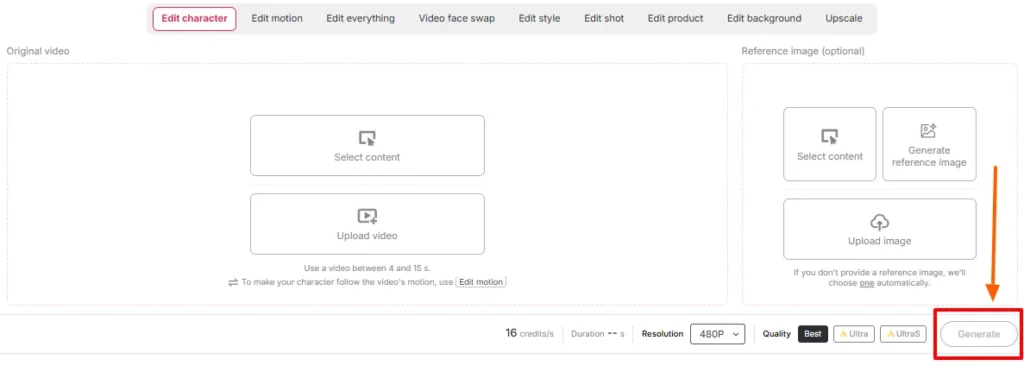
يتناسب وقت المعالجة طرديًا مع طول المقطع وجودته. لا تقم بتحديث الصفحة. لا تُنشئ مهمة ثانية على نفس الرصيد.
الخطوة — مراجعة جنبًا إلى جنب
شغّل الملف الأصلي بجانب الملف الناتج. تحقق تحديدًا مما يلي:
إذا كان هناك شيء's في حالة عدم وجود تطابق، يكون الحل دائمًا في المصدر - استبدل الصورة المرجعية أو اقتطع جزءًا أنظف من المصدر. نادرًا ما يؤدي إعادة معالجة نفس المدخلات إلى إصلاح التطابق الخاطئ.
الخطوة — إنهاء الأمر ببقية المجموعة
يُعدّ مُخرَج ReVideo الخام مُكوّنًا، وليس مُنتجًا نهائيًا. قم بتجميعه:
مشهد الفيلم مقابل اللقطات الإضافية: منهجان مختلفان
تبدو هذه متشابهة، لكنها لا تتصرف بنفس الطريقة على الإطلاق.
دليل اللعب أ - إدراج مشهد من الفيلم
تُعالج اللقطات السينمائية بدرجات لونية مختلفة، وتُضاء بشكل درامي، وعادةً ما تُصوّر بعدسات طويلة ذات عمق مجال ضحل.'s هدية وفخ.
افعل هذا:
تجنب: مشاهد الحركة السريعة، والدخان الكثيف، والظلال المبالغ فيها، واللقطات التي يكون فيها الهدف نصف خارج الإطار.
دليل التشغيل ب - جلسة تصوير اللقطات الإضافية
تُعدّ اللقطات الإضافية (B-roll) الاستخدامَ الخفيّ، وهي في الحقيقة مصدر معظم الأرباح. اللقطات الجاهزة - كشخص يمشي في مكتب، أو يفتح علبة منتج، أو يحتسي القهوة بجوار نافذة، أو يمسك هاتفه أمام الكاميرا - تتميز بنظافتها وإضاءتها المتساوية وتركيزها على شخص واحد. إنها مصممة عمليًا لاستبدال الشخصيات.
افعل هذا:
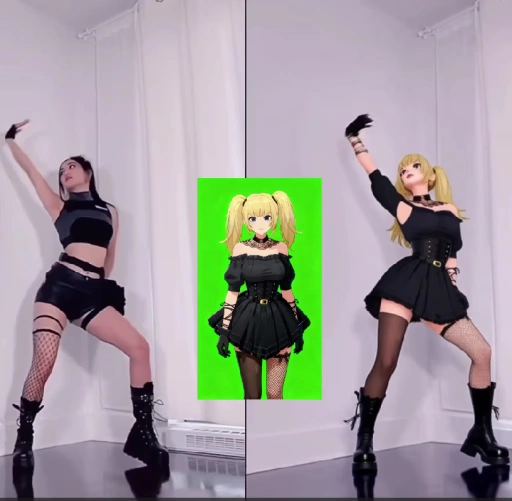
هذه هي آلية العمل الكامنة وراء الكثير من AI حسابات المؤثرين، والقنوات المجهولة، وصفحات منتجات التسويق بالعمولة التي تعمل حالياً.
حسابات الائتمان: التكلفة الحقيقية للأشياء
| طول الإخراج | حقوق النشر التقريبية | الواقع الافتراضي المجاني |
|---|---|---|
| 1 2 | ~ 26 | مريح |
| 3 ثانية | ~ 78 | مخصصاتك اليومية الكاملة |
| 5 ثانية | ~ 130 | يتطلب الأمر يومين مجانيين، أو خطة مدفوعة. |
| 10 ثانية | ~ 260 | منطقة مدفوعة الأجر |
| مجموعة من 5 نسخ مختلفة مدة كل منها 5 ثوانٍ | ~ 650 | خطط للاشتراك |
تنبيه: الرصيد المجاني مخصص لاختبار المدخلات، وليس لإنشاء جدول محتوى. شغّل اختبارات الصور المرجعية لمدة ثانية واحدة لكل صورة. عندما يبدو الاقتران مناسبًا، استخدم الرصيد المجاني لإنتاج العرض الكامل.
أخطاء شائعة في إعادة الفيديو وكيفية إصلاحها بسرعة
| ماذا حصل | لماذا | الإصلاح |
|---|---|---|
| تغيير الوجه للهوية في منتصف المقطع | الصورة المرجعية صغيرة جدًا أو بزاوية غير مناسبة | أعد تحميل صورة أمامية عالية الدقة |
| هالة غريبة تحيط بالشعر | خلفية مزدحمة خلف الموضوع's رئيس | اختر مقطع مصدر بفصل أوضح |
| تتحول الأيدي إلى أشكال مجردة | إيماءة سريعة + ضغط | انتقل إلى الجزء الأبطأ من الحركة |
| عدم تطابق لون البشرة | تضارب بين إضاءة المرجع وإضاءة المشهد | أعد إنشاء المرجع تحت إضاءة مماثلة |
| تم استبدال الشخص الخطأ | عدة مواضيع في الإطار | قص أو اختر مقطع فيديو لموضوع واحد |
| يبدو الناتج وكأنه ملصق. | كان المصدر يفتقر إلى حركة الجسم الحقيقية | استخدم لقطات فيديو تظهر فيها حركة الجسم بالكامل |
| الناتج قصير جدًا بحيث لا يمكن نشره | تم الوصول إلى الحد الأقصى للائتمان | استخدم برنامج Video Extender، أو قم بدمج صورتين. |
أين يتفوق فيديو APOB الجديد على تبديل الوجوه التقليدي؟
| لماذا يفوز ريفيديو | خفيف AI علوي قابل للتغيير الوجه | إعادة فيديو APOB |
|---|---|---|
| ما هي التغييرات | منطقة الوجه فقط | الوجه، والجسم، والزي، والشخصية العامة |
| مصدر الحركة | أصلي، لم يمس | تم الحفاظ على الأداء الأصلي وإعادة تقديمه |
| اتساق الهوية | يختلف السعر لكل مشبك | فعّل خاصية التعرف على الوجه في جميع أنحاء مكتبتك |
| التحكم في الخلفية | بدون سلوفان | تتوفر خاصية تغيير الخلفية |
| التحكم في الأسلوب | بدون سلوفان | إعادة التصميم متوفرة |
| تناسب احتياجات | نكات لمرة واحدة | خطوط إنتاج قابلة للتكرار |
تبديل الوجوه يمنحك نكتة. أما إعادة الفيديو فتمنحك ممثلاً يمكنك الاستمرار في استخدامه.
حالات استخدام حقيقية يستخدمها الناس الآن
الجزء الذي تتجاهله معظم الدروس التعليمية: الموافقة، وحقوق النشر، وتجنب المقاضاة
وضع وجهك في مشهد من فيلم أمر ممتع. أما وضع وجه شخص آخر فهو أمر ممتع.'s إن تصوير شخصين وجهاً لوجه، أو إعادة توزيع لقطات الاستوديو، أمر مختلف تماماً. تعامل مع هذا الأمر بشكل صحيح:
لقطات B-roll مرخصة بالإضافة إلى AI تُعدّ "بيرسونا" مزيجًا نظيفًا وقابلًا للتطوير وآمنًا تجاريًا. ابدأ البناء هناك.
ست نصائح احترافية من تجارب عملية
- اختبر لمدة ثانية واحدة قبل الالتزام. أرخص طريقة ممكنة للتحقق من اقتران الصورة بالمقطع.
- قم ببناء نموذج الصورة مرة واحدة، وأعد استخدامه إلى الأبد. ثبات قفل الوجه هذا هو السبب الرئيسي وراء اكتساب الشخصية الافتراضية للمتابعين.
- مصدر رأسي للإدخال، مخرج رأسي للإخراج. لا تقم باقتصاص صورة أفقية وتأمل.
- الإضاءة الساطعة والمتساوية المصدر هي الأفضل في كل مرة. تبدو تقييمات مودي رائعة، لكن عمليات التبديل سيئة.
- احفظ أفضل مقاطع الفيديو المصدرية كقوالب. الخطاف الفعال هو رصيد قيّم. جدده شهرياً.
- يتم تجميع الطلبات في أيام تجديد الرصيد. يتم إعادة تعيين الرصيد المجاني يوميًا. قم بإجراء اختبارات تراكمية على مدار أسبوع قبل عملية الدفع.
الأسئلة الشائعة حول إعادة إنتاج APOB
ما هو استخدام برنامج APOB ReVideo؟
يستبدل تطبيق APOB ReVideo الشخصية في فيديو موجود بوجهك أو صورة مرجعية أو AI نموذج مؤثر، مع الحفاظ على الحركة الأصلية والإيماءات وتدفق الكاميرا والخلفية سليمة.'s تُستخدم في تعديل مشاهد الأفلام، وإضافة لقطات إضافية، وإعلانات المحتوى الذي ينشئه المستخدمون، وتتبع اتجاهات الرقص، و AI المحتوى المؤثر.
هل تطبيق APOB ReVideo مجاني؟
هناك's باقة مجانية تمنح 80 رصيدًا يوميًا دون الحاجة إلى بطاقة. بمعدل 26 رصيدًا تقريبًا في الثانية، يغطي هذا الرصيد حوالي ثلاث ثوانٍ من الإنتاج يوميًا - وهو مناسب للاختبار، لكنه غير كافٍ للإنتاج الفعلي. أما الباقات المدفوعة فتتيح معالجة مقاطع فيديو أطول ودفعات أكبر.
ما هو الحد الأقصى لطول مقطع فيديو APOB ReVideo؟
كان الإصدار الأصلي يعمل بشكل أفضل مع مقاطع فيديو قصيرة لا تتجاوز بضع ثوانٍ، بينما تدعم الصفحات الأحدث التي تعمل بتقنية WAN تحميل مقاطع فيديو أطول. تحقق من الحد الأقصى للطول المعروض في مساحة العمل الخاصة بك، حيث يتغير مع كل تحديث للنموذج.
هل أحتاج إلى إنشاء AI النموذج أولاً؟
لا، يمكنك تحميل صورة مرجعية مباشرةً. لكن إنشاء نموذج بورتريه يمنحك هوية متسقة في جميع عمليات العرض المستقبلية، وهو أمر بالغ الأهمية لأي شخص يدير حسابًا متكررًا.
التي AI محرك يدعم إعادة تشغيل APOB؟
يعمل على نقل الحركة بأسلوب Wan 2.2 Animate، والذي يقرأ الحركة من مقطع المصدر الخاص بك ويعيد بناء شخصية جديدة على بنية الحركة هذه بدلاً من إنشاء الفيديو من الصفر.
هل يمكن لبرنامج APOB ReVideo تغيير الخلفية أيضًا؟
نعم، تتولى خاصية ReBackground استبدال المشهد عندما لا يتناسب الموقع الأصلي مع عملية التحرير. أما خاصية ReCharacter وحدها فتحافظ على الخلفية كما تم تصويرها تماماً.
هل يعمل مع الأنمي، والرسومات ثلاثية الأبعاد، والشخصيات غير البشرية؟
نعم، هذا صحيح. فالشخصيات المرسومة، والنماذج ثلاثية الأبعاد، وحتى صور الدمى أو التماثيل المرجعية تعمل كموضوع بديل، مما يفتح المجال أمام محتوى منمق وذو طابع تميمة.
لماذا تبدو الصورة التي أعرضها ضبابية أو مشوهة؟
غالباً ما يكون السبب مشكلة في المصدر. يؤدي ضغط اللقطات، أو حركة الكاميرا السريعة، أو وجود عناصر محجوبة، أو استخدام صورة مرجعية منخفضة الدقة إلى تدهور جودة الصورة. قم بتبديل مصادر الإدخال قبل إعادة التسجيل.
هل يمكنني استخدام فيديوهات APOB ReVideo تجارياً؟
نعم عموماً، بشرط امتلاكك حقوق اللقطات الأصلية والشخصية المستخدمة. يُعدّ استخدام الشخصيات المُولّدة بالذكاء الاصطناعي على لقطات مرخصة أو مملوكة الخيار التجاري الأكثر أماناً.
كيف يقارن هذا بالوضع العادي؟ AI مبدل الوجوه؟
يقوم برنامج تبديل الوجوه بتعديل منطقة الوجه. أما برنامج ReVideo فيستبدل الشخصية بأكملها - الوجه والجسم والزي والأسلوب - مع الحفاظ على الأداء الأصلي.'s صُممت لاستبدال الشخصية بالكامل، وليس للنكات ذات الإطار الواحد.
هل يُسمح لي قانونياً بوضع نفسي في مشهد من فيلم؟
لا بأس عمومًا بالتجارب الشخصية. أما نشر أو تحقيق الربح من لقطات الاستوديو المعدلة فيُعدّ مسألة حقوق ملكية فكرية بغض النظر عن عملية التبديل، وإدخال أي شخص آخر.'s يُعدّ تصوير الوجه دون موافقة مشكلة قانونية منفصلة. أما استخدام الصور المرخصة والمقاطع المتاحة للعموم فيُجنّبك هذه المشكلة.
ما هي مقاطع الفيديو المصدرية التي تعطي أفضل النتائج؟
موضوع واحد، إطار مركزي، إضاءة متساوية، حركة جسم واضحة، أقل قدر من الحجب، ودقة جيدة. عروض المنتجات، ولقطات المشي والتحدث، ومقاطع الرقص تتميز بجودة عالية باستمرار.
خذ النهائي
APOB ReVideo هو نادر AI ميزة فيديو تتيح لك التحكم بجودة الفيديو بشكل أساسي، وليس بجودة العارض/ة. زودها بمقطع فيديو واضح لشخص واحد وصورة مرجعية حادة، وستحصل على فيديو جاهز للنشر. زودها بصورة ضبابية من حشد من الناس وصورة سيلفي ملتقطة في الساعة الثانية صباحًا، وستحصل على النتيجة المتوقعة تمامًا.
الميزة الحقيقية ليست في تعديل مشهد فيلم لمرة واحدة يحصد بضعة آلاف من المشاهدات.'s خط الإنتاج: واحد متسق AI أقنوممكتبة واحدة تضم مقاطع فيديو أصلية مجربة، وإمكانية إعادة إنتاج صيغة ناجحة عدة مرات حسب رصيدك. هذا's كيف هي القنوات المجهولة، ومتاجر إعلانات المحتوى الذي ينشئه المستخدمون، و AI حسابات المؤثرين تعمل بالفعل في عام 2026.
ابدأ باستخدام 80 رصيدًا مجانيًا. اختبر ثلاث صور مرجعية، كل منها لمدة ثانية واحدة. ابحث عن الصورة التي تحافظ على هوية الشخصية حتى بعد تحريك الرأس. ثم قم بتغيير حجمها.
اللقطات موجودة بالفعل. أنت فقط تغير الشخص الذي يتم تصويره's فيه.
توصي AiMojo بـ:


 BONUS: احصل على 200 دولارAI "مجموعة أدوات الإتقان" مجانية عند التسجيل!



![أفضل 11 عمال نظافة AI بدائل لمحادثات NSFW [نوفمبر 2026]](https://aimojo.io/wp-content/uploads/2024/01/Best-Janitor-AI-Alternatives-100x100.webp)