

Uizard Key Insights
What is Uizard?
უიზარდი is an AI-powered UI design tool built for product managers, startup founders, marketers, and non-designers who need to create wireframes, mockups, and interactive prototypes without professional design training. Its flagship feature, Autodesigner 2.0, takes plain-text prompts and generates multi-screen, editable app or website prototypes in seconds, using a conversational approach that mirrors how product teams actually think.
The platform also converts hand-drawn sketches and screenshots into digital, editable designs, making it a practical automation tool for rapid ideation and early-stage product validation. Originally founded in 2018 as an AI-first design tool, Uizard sits squarely in the prototyping and UI ideation space, acting as a fast-lane alternative to fully featured design environments for teams that prioritise speed over pixel-perfect output.
Autodesigner 2.0 is the core engine that sets Uizard apart from every other wireframing tool on the market. You type a product description in plain English, and the AI generates a complete, multi-screen, editable prototype within seconds.
From there, you can select any component and describe a modification in text, and the AI applies the change instantly. For product managers who spend hours hand-drawing flows on whiteboards, this feature alone eliminates an entire stage of the pre-design process.
უიზარდი's scanner features are genuinely useful in day-to-day product work. The Wireframe Scanner digitises ხელით დახატული ესკიზები into editable UI components, and the Screenshot Scanner pulls apart any app or web screenshot into a format you can modify directly in the editor. This means you can lift a competitor's layout structure, pull it into Uizard, and use it as a starting point for your own build without redrawing anything from scratch.
Not many tools at this price point include predictive UX analysis. Uizard's Focus Predictor uses AI to generate an attention heatmap on any screen, showing where real users are likely to look first. This is a genuinely valuable pre-usability-test feature for product teams who want directional data before committing to a full research sprint. For solo founders or lean startups, it functions as a lightweight UX audit tool built into the same workspace.
Uizard supports multiplayer editing, allowing multiple team members to work on the same project simultaneously. Stakeholders can be invited as viewers without needing a paid seat, which reduces friction in client and investor feedback cycles. For consultants and agencies specifically, the ability to share a live, clickable prototype link without forcing a client to create an account is a practical workflow advantage.
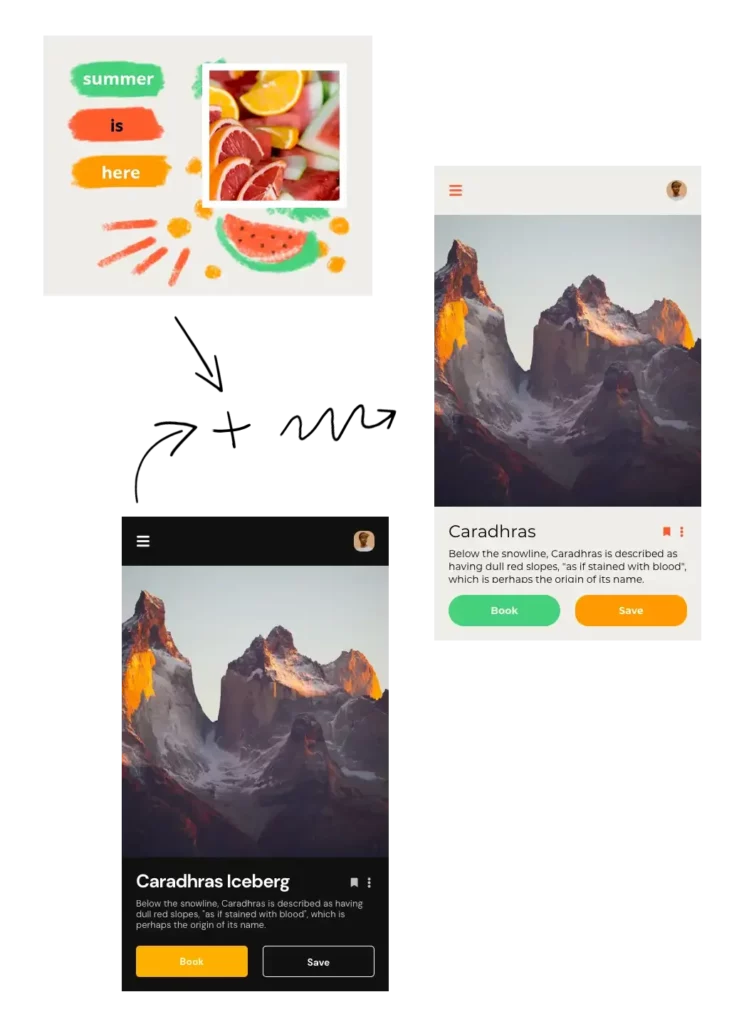
With Brand Kit, teams can feed Uizard their colour palette, typography, and component styles, and the AI will apply those guidelines to any generated screen. The Theme Generator takes this further, producing entirely new visual themes for a project in seconds. This is a direct productivity gain for agencies handling multiple client accounts who need to spin up on-brand concept designs quickly.
Uizard ფასების გეგმები
| გეგმა | ღირებულება | ძირითადი თვისებები |
|---|---|---|
| უფასო | $0 | 2 projects, 10 screens per project, basic AI, PNG export |
| პოსტი | $ 12 / თვე | Unlimited projects and screens, all AI features, screenshot scanner, PDF/SVG/PNG export |
| Business | $39/თვეში თითო მომხმარებლისთვის | Everything in Pro, custom branding, team management, priority support |
Where Uizard Falls Short
The absence of a Figma export is a known friction point for professional teams. Once a concept moves from the ideation stage into detailed design and development, you will need to rebuild the work in another tool.
There is no code handoff feature, which means developers cannot extract clean CSS or React components directly from a Uizard file the way they can from Figma or Penpot. For teams that need a full design-to-development pipeline, Uizard is a starting point, not a finishing point.
დადებითი და უარყოფითი მხარეები
- Fastest text-to-prototype tool available.
- Sketch and screenshot scanning built-in.
- Attention heatmap for early UX validation.
- No design experience required.
- Generous free tier for solo users.
- Real-time collaboration on all paid plans.
- No Figma export option.
- No code handoff for developers.
- AI outputs can feel generic on complex prompts.
Uizard for Product Teams vs Solo Founders
For solo founders building an early-stage MVP, Uizard is arguably the most time-efficient design tool available in 2026. The Free plan handles two full projects, which is enough to prototype an app concept end to end and present it to potential investors or co-founders.
For product teams inside organisations, the Business plan's team management and priority support make it a viable rapid ideation layer that sits in front of a more mature design process in Figma or similar.
Best Uizard Alternatives
| AI UI Design and Prototyping Tool | AI Generation Capability | Developer Handoff |
|---|---|---|
| ფიგურა | Limited (via plugins) | Full code export and Dev Mode |
| გალილეო AI | Strong text-to-UI generation | No native handoff |
| თვალნათლივ | მყარი AI features, Figma export | Partial via Figma integration |
| ჩარჩო | შაბლონზე დაფუძნებული AI თაობის | Built-in publish to web |


